Context
Griptape Nodes
Foundry acquired Griptape, a startup building Griptape Nodes, an AI workflow platform for VFX and creative pipelines. I was brought in to work with the Griptape team.
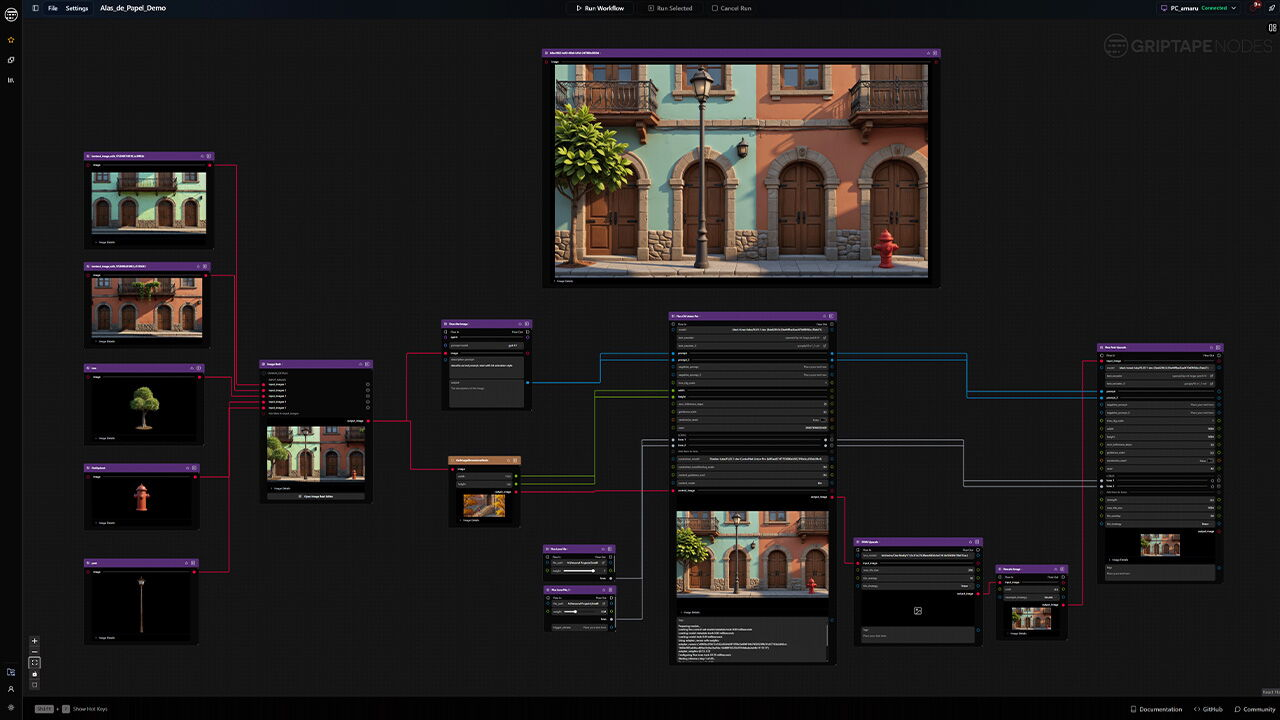
Artists build on a node canvas, and every node, panel and dialog on it comes from one shared component library.
The problem
Screens were built by different engineers over time, each adjusting the shared components as they went. Nobody could see the whole system, so the same decisions got made again, each time slightly differently.
Working with Claude Code
Claude Code made the slow parts fast: counting thousands of style rules, rebuilding 38 components, and writing code and specs. It still needed a designer in charge. I set the goals, made every decision, spotted wrong colours, and checked each result before it went to a developer.
Everything on one page
Before fixing anything, I made the problem visible. I made a design-system branch of the code so I could work without touching the live app, then pulled styles from many files, written by many engineers, into one UI library page: every colour, every component in all its variants, and the real screens built from them.
For the first time, engineers, product and design could point at the same thing, and everything after this depends on it.
What I did
- Made the design-system branch
- Pulled the styles from many files into one UI library page
- Decided what the page should show: colours, components, variants and real screens
- Shared it with the team
How Claude Code helped
- Searched the files for every style
- Did the counting and the repetitive building
- Showed me each result to check
Examples from the UI library page
Six of the 49 sections.
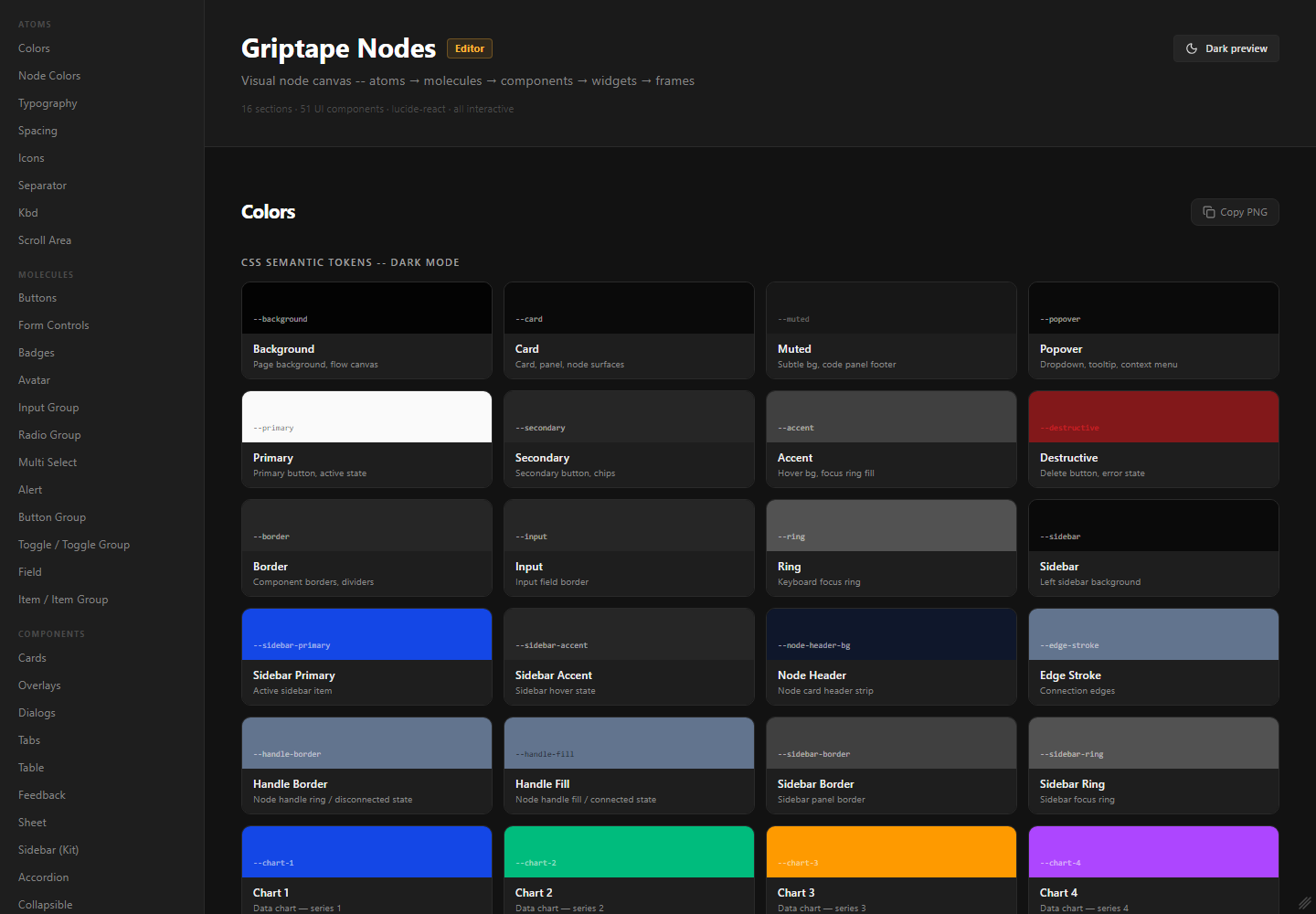
Colours. Every colour token, its name in the code, and where it is used.
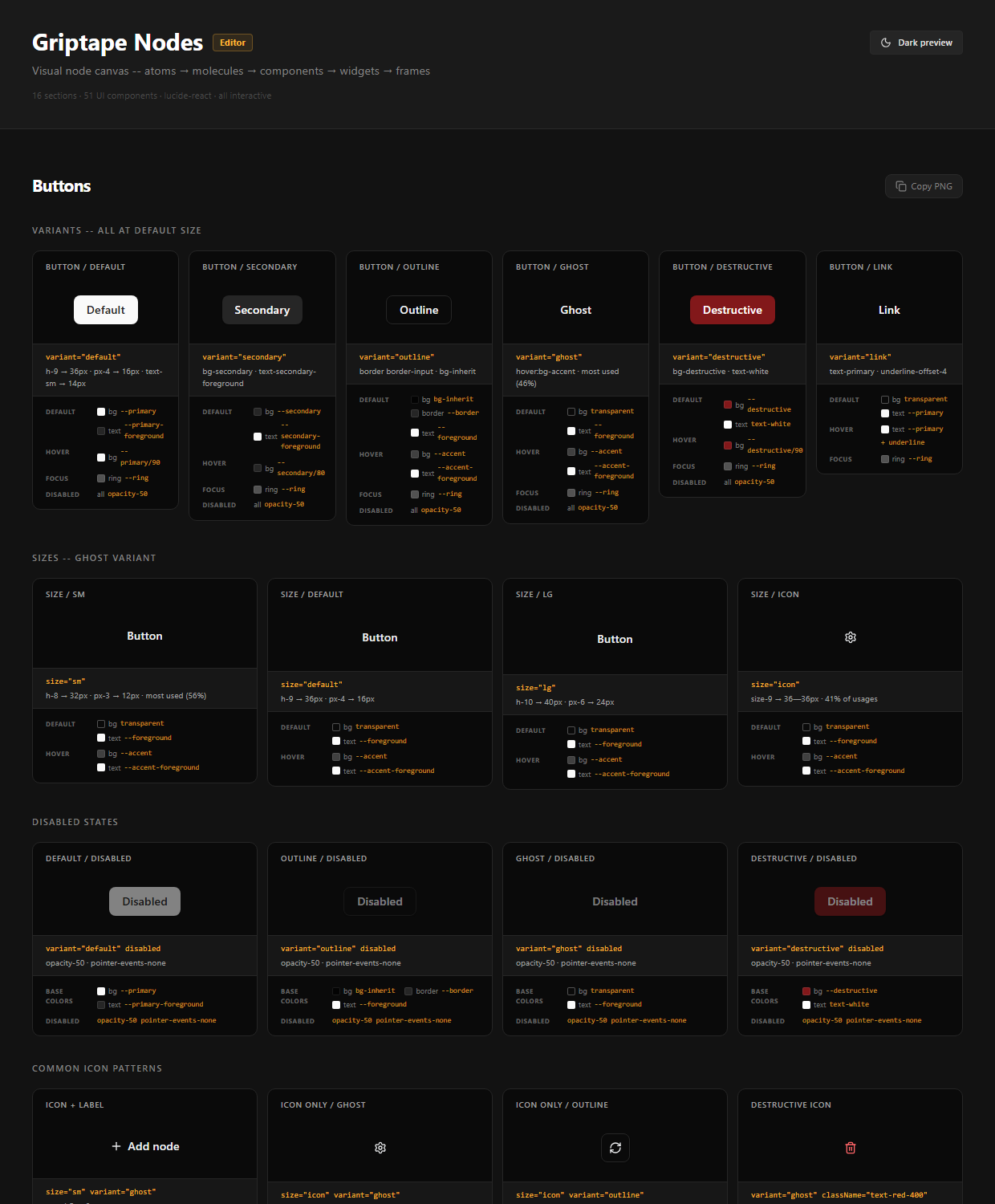
Buttons. Every button variant and size, with its default, hover, focus and disabled states.
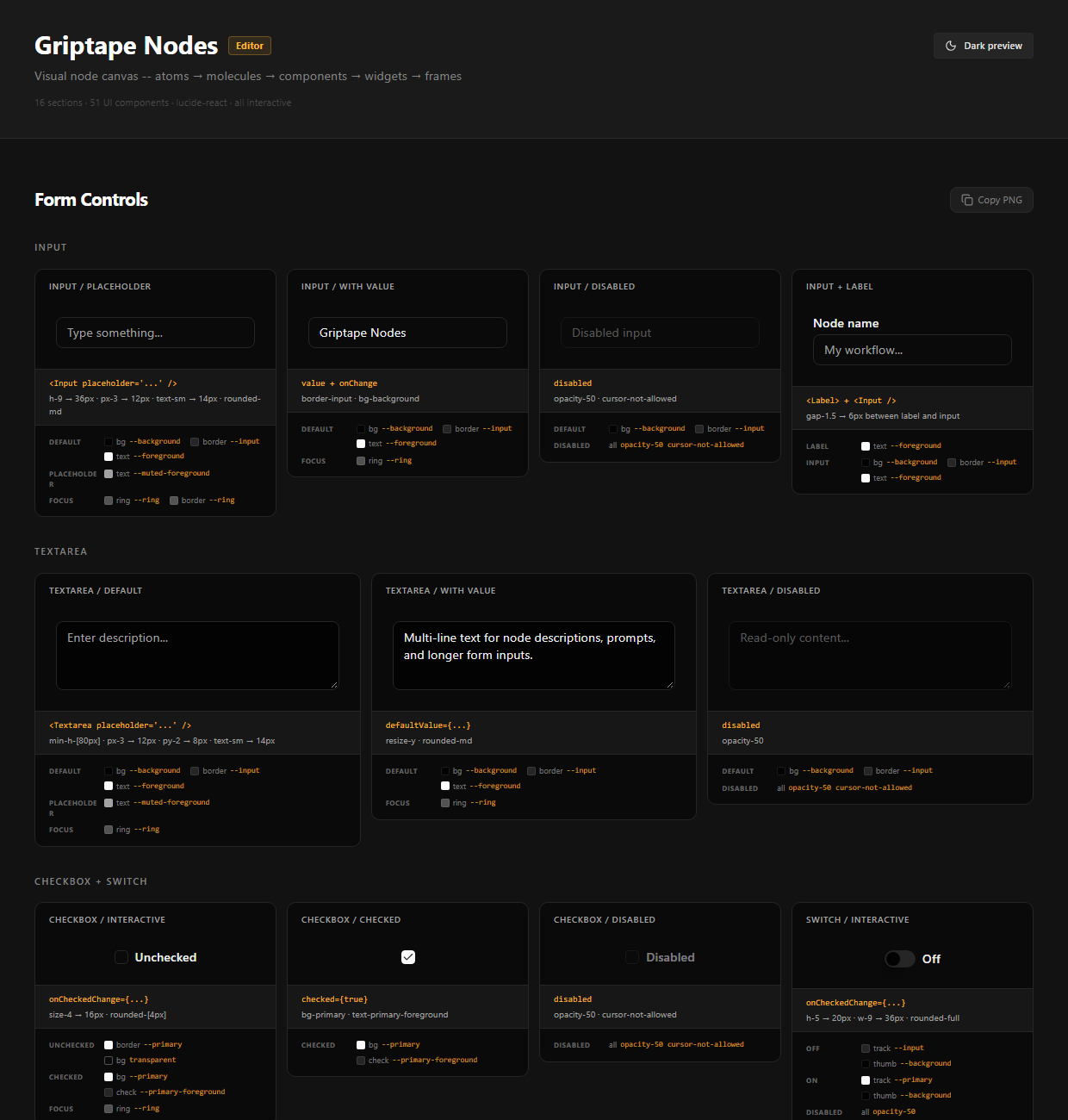
Form fields. Input and Select side by side. This is where the mismatch first became obvious.
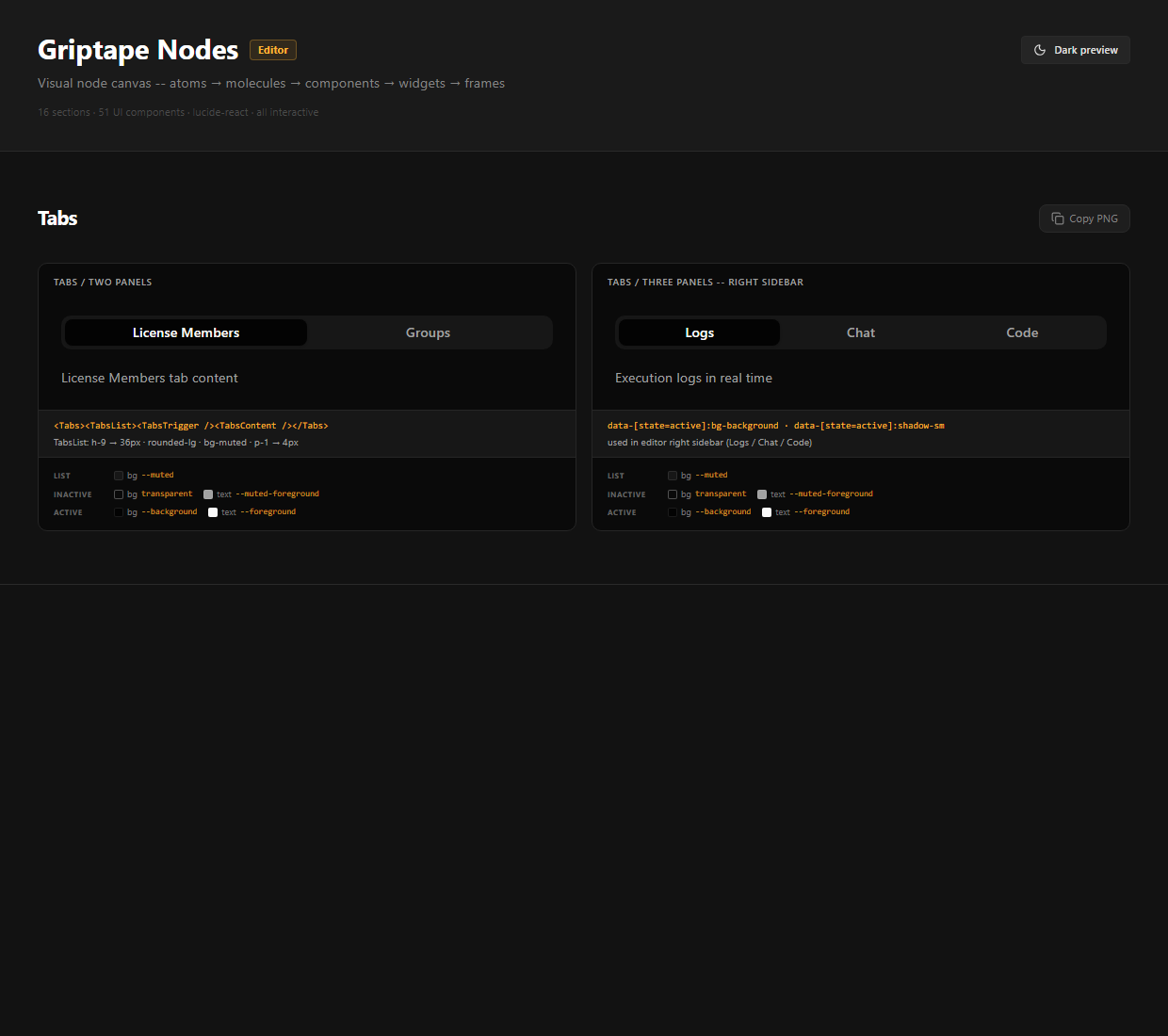
Tabs. The standard tab style. Three more were hiding inside the real screens.
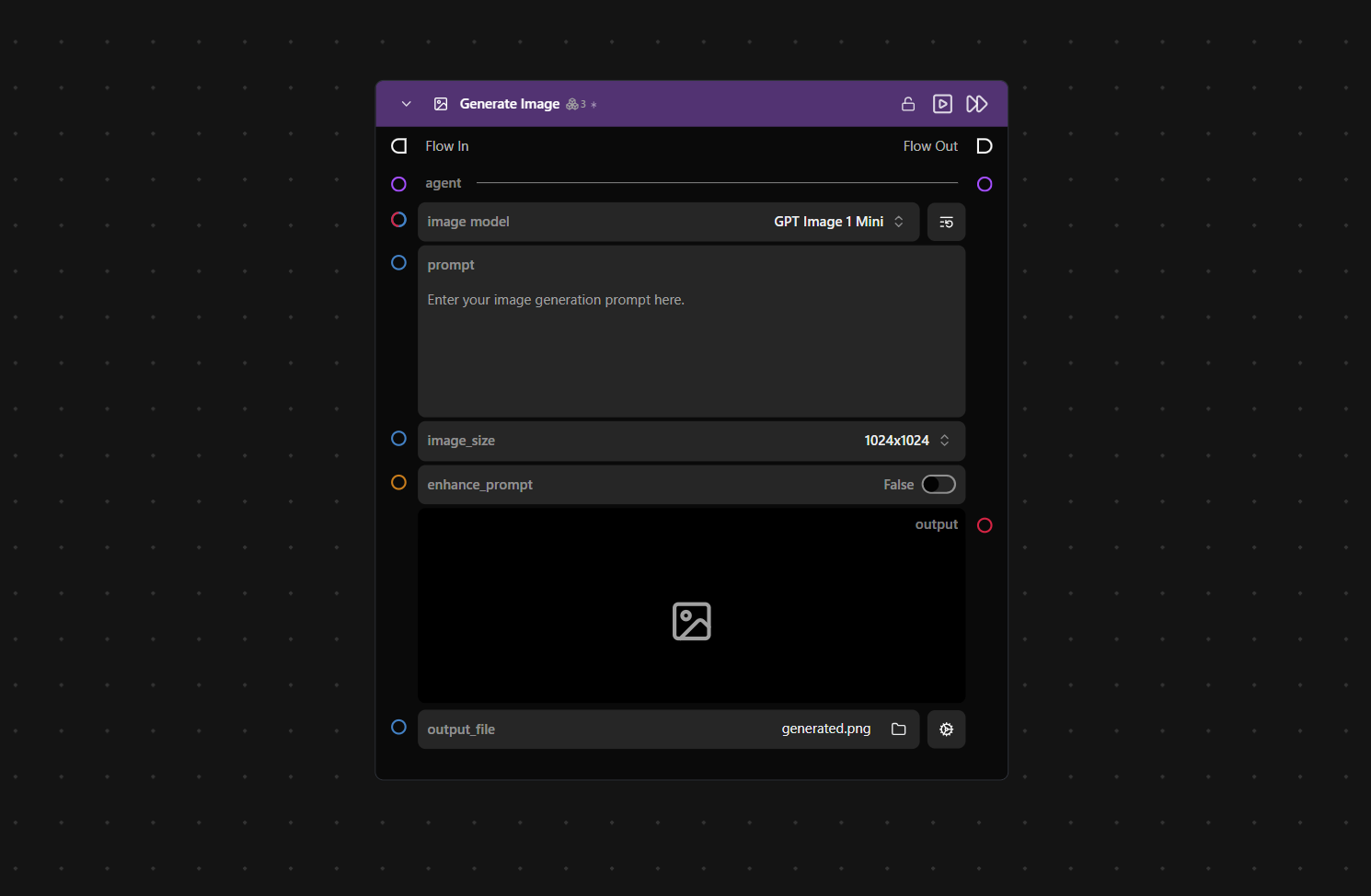
A real screen: the node card. A “Generate Image” node, built from shared components: Select, Textarea, Switch and icon buttons.
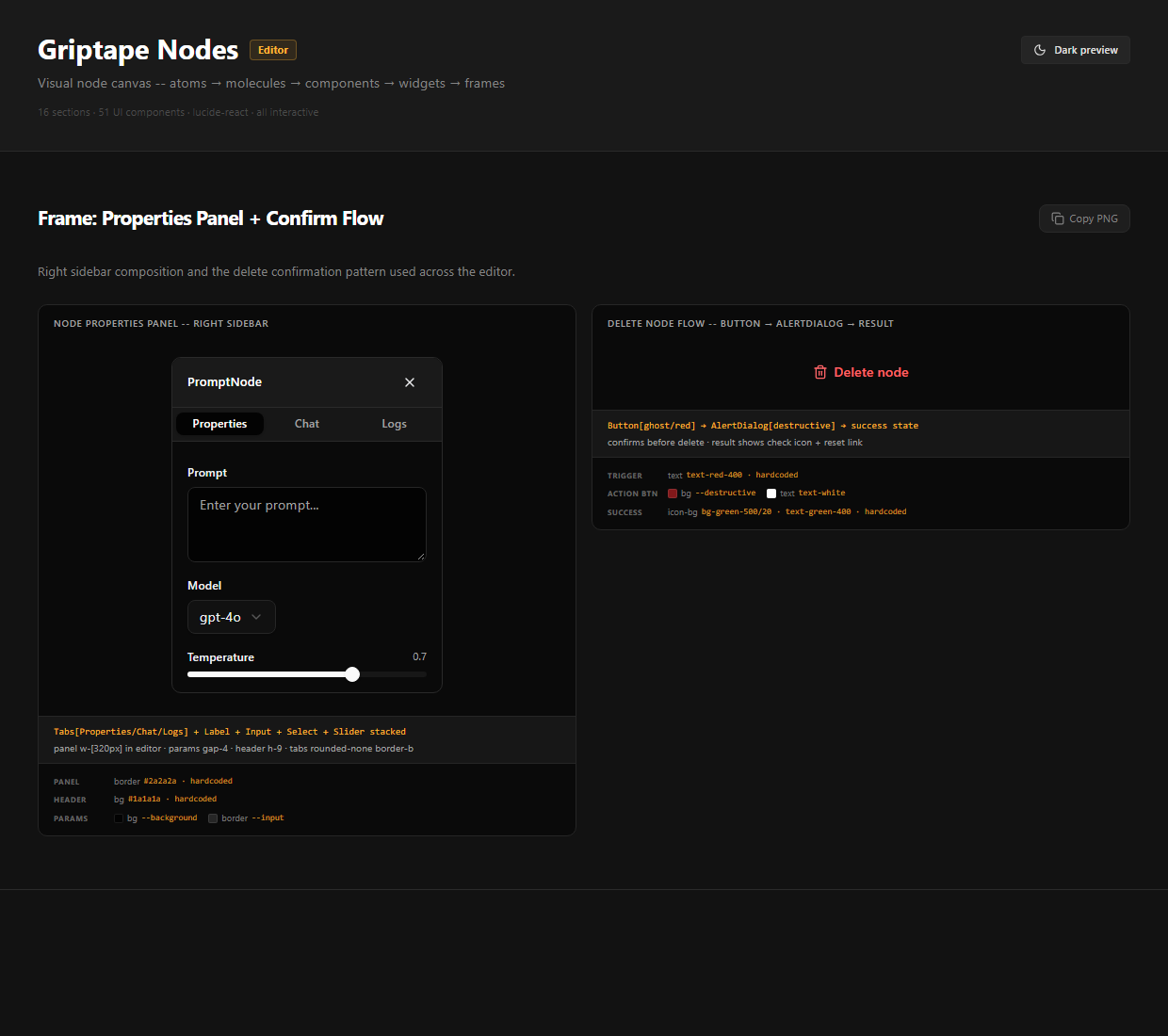
A real screen: the properties panel. One of the places where the tabs had been restyled by hand.
The audit: counting it
I exported the UI library page and had Claude Code go through all 7,051 elements and 2,175 style rules, counting every colour, text size, radius and shadow, and noting where each was used.
In the component library: what I found, and what should be there
Hard-coded greys
6 → 0
Text sizes
8 → 5
Radii
7 → 5
Shadows
3 ✓
Tab styles
4 → 3
Counted only inside the 602 shadcn components on the page, not the library page's own styling. Greys: white and black (Button, Badge, Avatar, Resizable), gray-200 and gray-400 (Resizable handle), neutral-500 (Popover trigger) and #2a2a2a (TabsList); every other grey already comes from a token. Text sizes: 9, 10, 11 and 12px sit beside xs, sm, base and lg. Radii: 4px is written two ways, plus a 5px one-off. Shadows: only xs, sm and lg are used, which is already right.
Across the whole app, screens included
30 hard-coded greys, sorted into 8 groups
Each group sits right next to a token that already existed; people typed a slightly different copy instead of using it. Each group should simply use the token on the right.
15 text sizes
Sizes in red are exact copies of a size that already had a name. Only 8 are needed.
10 radii
2, 3, 4 and 5 pixel corners are almost impossible to tell apart. Only 5 are needed.
Components that don't match, and copies
| What I found | How many | Why it matters |
|---|---|---|
| One Button, styled in different ways | 25 ways | Missing sizes were patched by hand on each screen |
| Buttons built from scratch instead of using Button | 30 | They miss the shared hover, focus and disabled states |
| Dialogs that fight Dialog (remove its padding, hide its close button, set their own size) | 3 | Three different header and footer spacings, three ways to close |
| Styles of one Tabs component | 4 | Users switch panels in four different-looking ways |
| Form fields that look different side by side | 3 | Input, Select and Textarea didn't match |
| Components copied from an older version of the library | 3 | They were never updated with the rest |
Asking why before changing anything
Before changing anything, I went to the engineers who had built each piece and asked why it was built that way. Some of the differences had a good reason behind them, so those stayed as they were. The one rule I held everywhere was that nothing kept a hard-coded value: if a difference stayed, it stayed as a token or a variant.
Rebuilding it to match the app, not the ideal
The main design decision: before changing anything, I rebuilt the system in Figma exactly as it exists in the code today, with the same names and the same values, rather than designing a clean new one.
What it cost
- The messy parts came along too
- No clean, new-looking library to show
What it bought
- Figma and code use the same names and values
- A fix in Figma maps straight to a code change
- Engineers trusted the file
Layer 1 · Palette
47 raw colours
Every colour allowed. Designers never pick these directly. neutral 900 = a dark grey.
Layer 2 · Tokens
40 colours with a job
Each one has a job, like “muted background”, and points to one colour from the palette. muted → neutral 900.
Layer 3 · Components
All 38 components
Every component only uses tokens, never raw colours. Card uses muted for its background.
Layer 1 · Primitives (47)
The raw palette, as it already existed in the code. Grouped by family.
neutral · 11
cool (light theme) · 15
slate (nodes) · 5
red · 3
hues (charts, sidebar) · 5
chart-muted · 5
base & brand · 3
Layer 2 · Semantic tokens (40)
The tokens with a job, as they already existed in the code, shown in dark mode. Hover one to see the primitive it points to.
What I did
- Decided: mirror the code first, clean it up after
- Built all 38 components in Figma, the 12 most-used first
- Fixed the foundations: colour, text, radius, spacing
- Added two new components: PermissionToggle and Charts
How Claude Code helped
- Converted the colours from the code into Figma variables
- Sped up the variant building
Foundations, fixed
Before touching a component, I fixed what every component is built from. Each value the audit found now lands on one named step, in Figma and in the code.
Colour
Every hard-coded grey now uses the token that already did the same job.
Tokens added during the fixes:
Text · 6 sizes × 3 weights
19 text styles in Figma, named like the Tailwind classes. The 15 sizes in the app map onto them.
text-xsRun workflow · 12/16absorbs 9, 10, 11, 12pxtext-smRun workflow · 14/20absorbs 13, 14pxtext-baseRun workflow · 16/24absorbs 16pxtext-lgRun workflow · 18/28text-xlRun workflow · 20/28absorbs 20pxtext-2xlRun workflow · 24/32absorbs 28, 32px (page titles)Radius
One base radius (10px) with steps around it. 2–5px one-offs become xs or sm; 10px and 14px typed in become lg and xl.
2px sm
6px md
8px lg
10px xl
14px 2xl
16px full
∞
Spacing
One 4px scale, 18 steps. Odd values like 3, 5, 9 and 23px move to the nearest step.
The components in Figma
I built all 38 components on those foundations. These are instances of the real component sets, every variant shown, in dark mode.
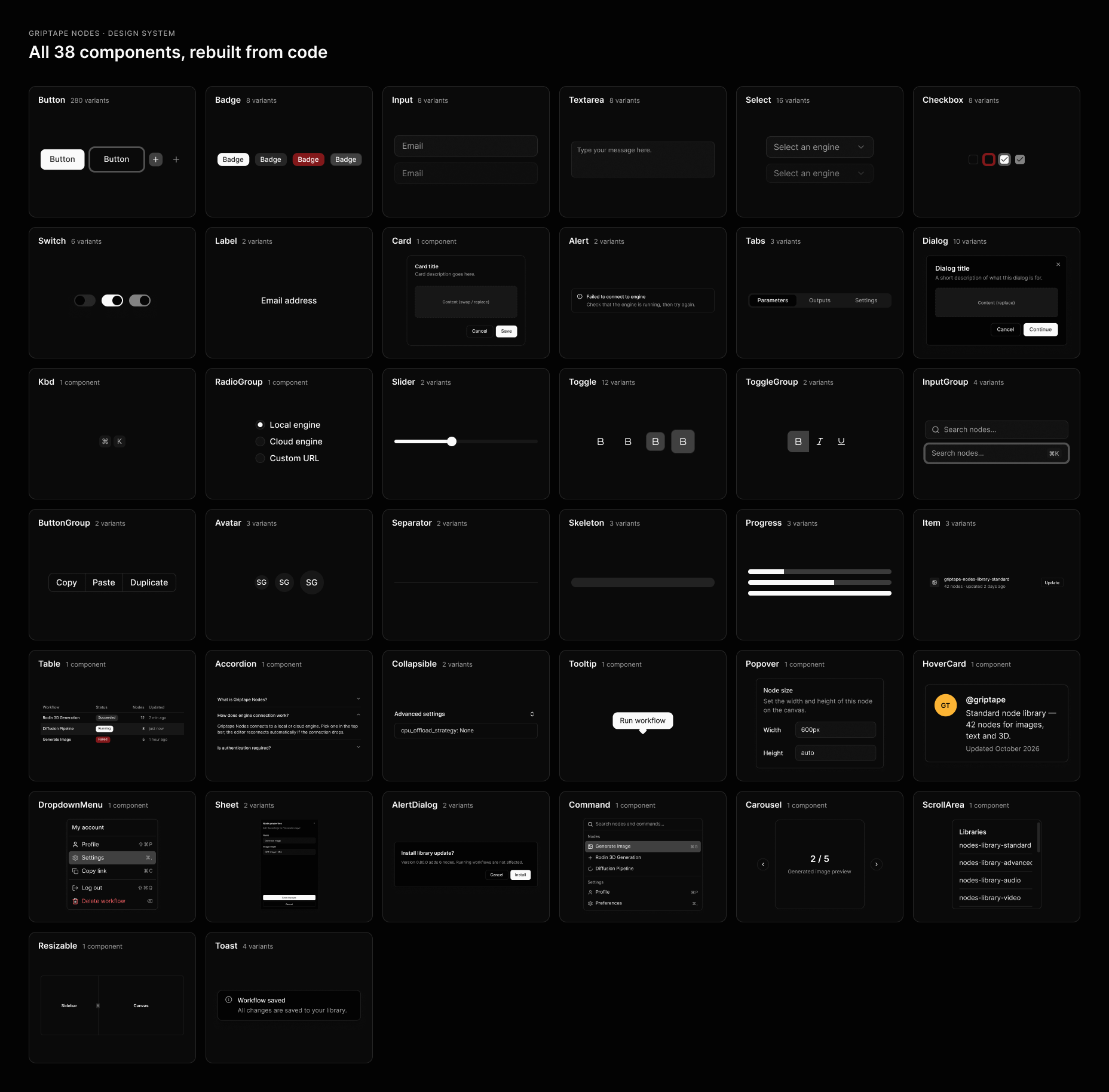
All 38 components in Figma, in dark mode. One card per component, each showing real instances of the component set and its variant count.
What I fixed
Each fix followed the same loop: spot it in the UI library → fix it in Figma → change the code → write the PR annotation → review → merge.
- Form fieldsInput, Select and Textarea share one style instead of three.
input-background - TabsFour hand-made styles become one prop. The sidebar tabs now work with the keyboard.
variant="pill | folder | underline" - Buttons19 hand-built buttons replaced; five icon sizes become three; red and white text no longer typed in.
size="xs | icon-xs | icon-sm"variant="ghost-destructive | on-color"destructive-texton-color - DialogsThree dialogs stop overriding Dialog: sizes, a sectioned layout and the close button are now props.
size="sm…full"layout="sectioned"showCloseButtonDialogBody
What a fix looks like in code: twelve hand-written classes become one word
- <TabsList className="flex w-full -mb-1.5 space-x-1 bg-inherit …">
+ <TabsList variant="folder">
New component
PermissionToggle
The permission buttons were rules that lived inside one screen: a global setting (Exploration or Production) and, per row, Default, Allow or Deny. I turned them into two components so the next screen that needs permissions gets them for free. Case study 1 covers the design.
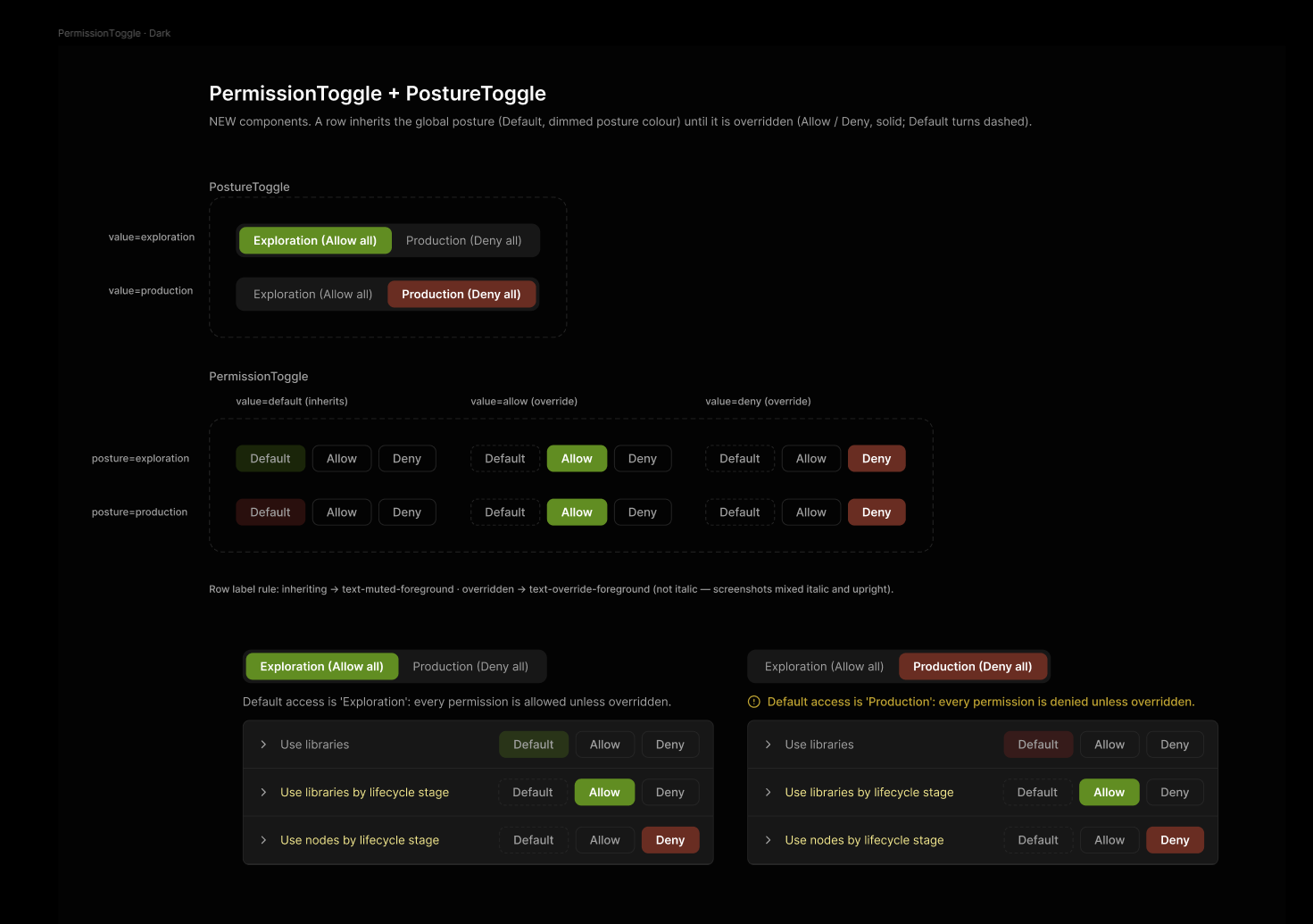
The components in Figma. PostureToggle (2 variants) and PermissionToggle (6): two postures × Default, Allow, Deny, with the screen built from them in both postures.
Tokens added · 8
The PR annotation
Every change I handed over came with the same six-part annotation, so a reviewer never has to guess what I meant. This is the one for PermissionToggle.
The permissions screen builds its Exploration/Production switch and its Default / Allow / Deny buttons by hand. The rule that ties them together lives only in screen code: Default inherits the global posture; Allow and Deny override it. These two components make that rule reusable and consistent.
Figma: Design-System › PermissionToggle, both component sets plus a dark-mode example.
- Tokens in
index.css(andmanage.css,.ds-force-light): the 8 above - New
components/ui/posture-toggle.tsx: Radix ToggleGroup +cva, propvaluematches Figma - New
components/ui/permission-toggle.tsx: propspostureandvaluematch Figma resolvePermission(posture, value)returns the permission that actually applies- A new section on
/design-system, and an entry incomponents.md - Follow-up commit: the permissions screen swaps its hand-built buttons for the two components
| Posture | Row | Default button | Allow / Deny | Row label |
|---|---|---|---|---|
| Exploration | default | allow-muted (dim green) | outline | muted-foreground |
| Production | default | deny-muted (dim red) | outline | muted-foreground |
| any | allow | dashed outline | Allow solid allow | override-foreground |
| any | deny | dashed outline | Deny solid deny | override-foreground |
- Tab into a group; arrow keys move; Space/Enter selects; the focus ring shows
- A screen reader announces “Default (inherits Allow/Deny)”
- Clicking the selected option doesn't clear it
/design-systemin light and dark; Manage UI has the tokens
- Colours match the source design: Allow
#548F1A, Deny#732720; inheriting is green at 25% or#7F1D1Dat 35% - The changed-row label turns amber instead of italic
- Copy reads “Deny all”, to match “Allow all”
How an engineer uses it: one line per row
<PermissionToggle posture="production" value="default" /> // Default follows the global setting
New component
Charts
For the usage audit feature I built the charts admins use to see where credits go: spend over time per AI model, donuts for projects and access groups, and ranked bars per license key. I built them with Recharts, and used the /dataviz skill to decide how they should look: chart type, colour, marks, tooltips, legends and interaction. They worked, but they lived inside one screen. So I turned them into a chart family the next feature can reuse.
Examples built only from the components
Two usage audit screens and the chart palette, rebuilt in Figma from 12 components and the new chart tokens.
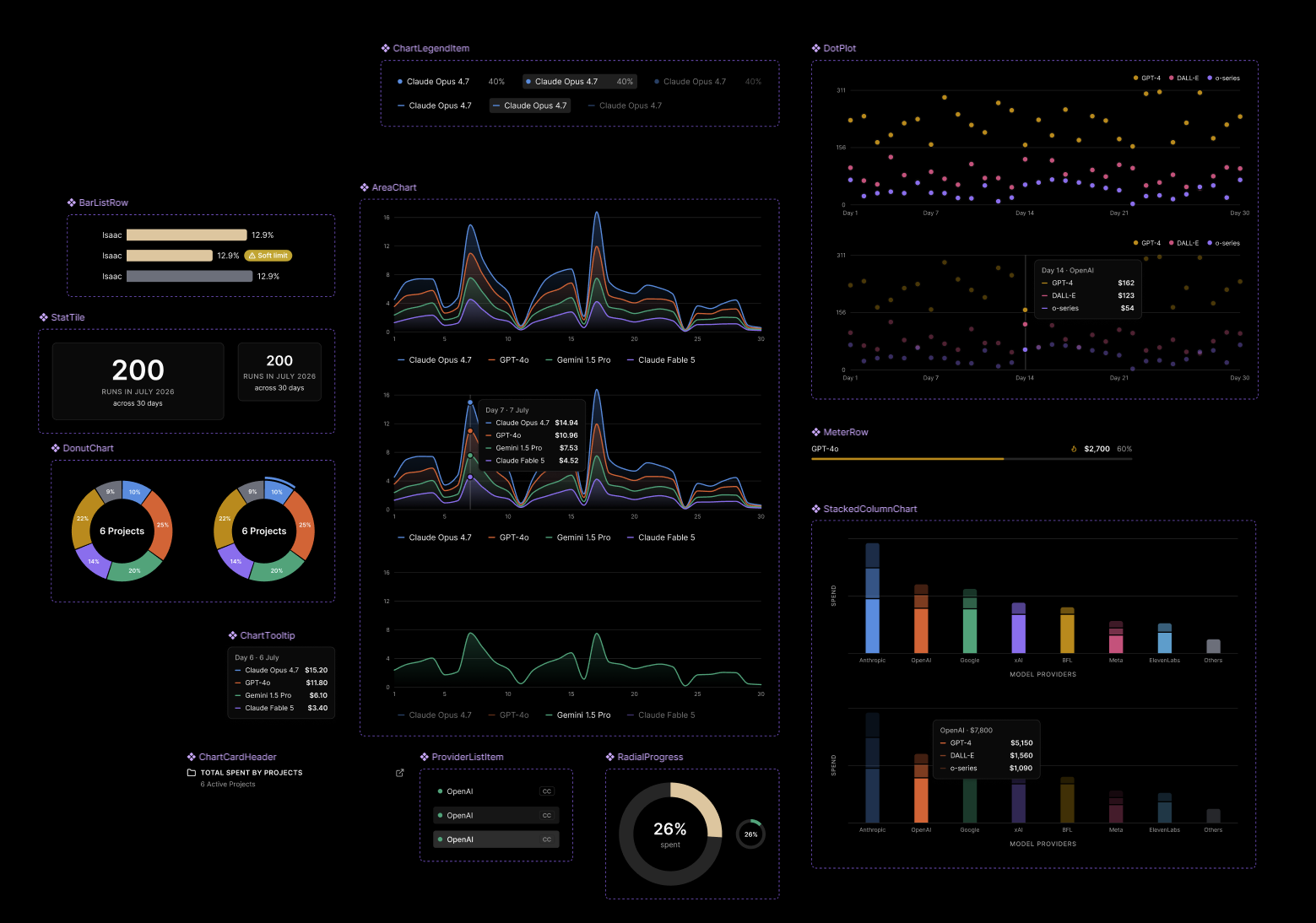
The components in Figma. All 12 chart component sets with their variants: AreaChart (all, hover, filtered), DonutChart, StackedColumnChart, DotPlot, RadialProgress, BarListRow, MeterRow, StatTile, ProviderListItem, ChartLegendItem, ChartTooltip and ChartCardHeader.
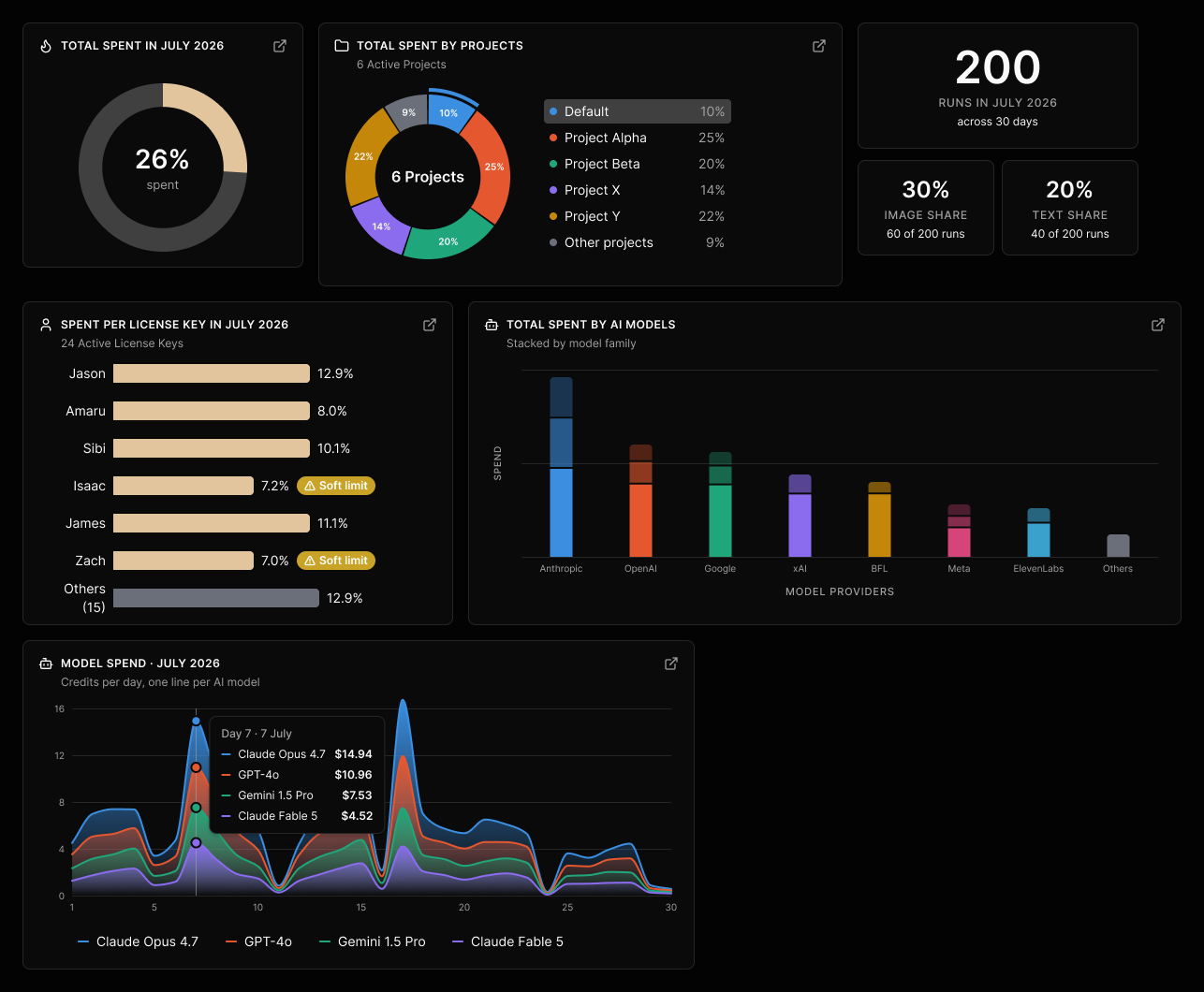
Overview screen. Built only from the components: RadialProgress, DonutChart with its legend, StatTile, BarListRow with soft limits, StackedColumnChart and AreaChart with its hover tooltip.
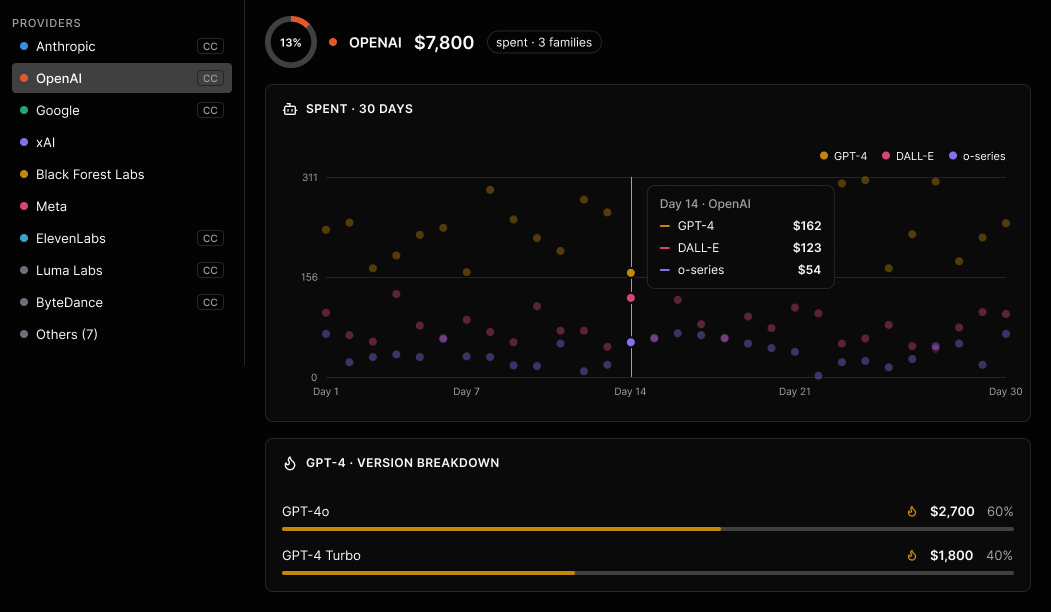
Per model screen. ProviderListItem filters the page; a small RadialProgress, DotPlot with hover, and MeterRow for the version breakdown.
| Chart in the product | Component |
|---|---|
| Spend over time per model | AreaChart (all, hover, filtered) |
| Projects, access groups, model mix, model families | DonutChart + ChartLegendItem |
| Total spent, provider share | RadialProgress (large, small) |
| Spend by AI provider, stacked by family | StackedColumnChart |
| Daily spend per model family | DotPlot |
| Spend per license key | BarListRow (default, soft limit, other) |
| Version breakdown | MeterRow |
| Runs and share figures | StatTile |
| Provider filter list | ProviderListItem |
| Every card and every hover | ChartCardHeader, ChartTooltip |
Tokens added · 10
chart-1…chart-5 already existed with stock shadcn colours; they now point to the usage audit palette. The other five are new. Dark-mode values shown.
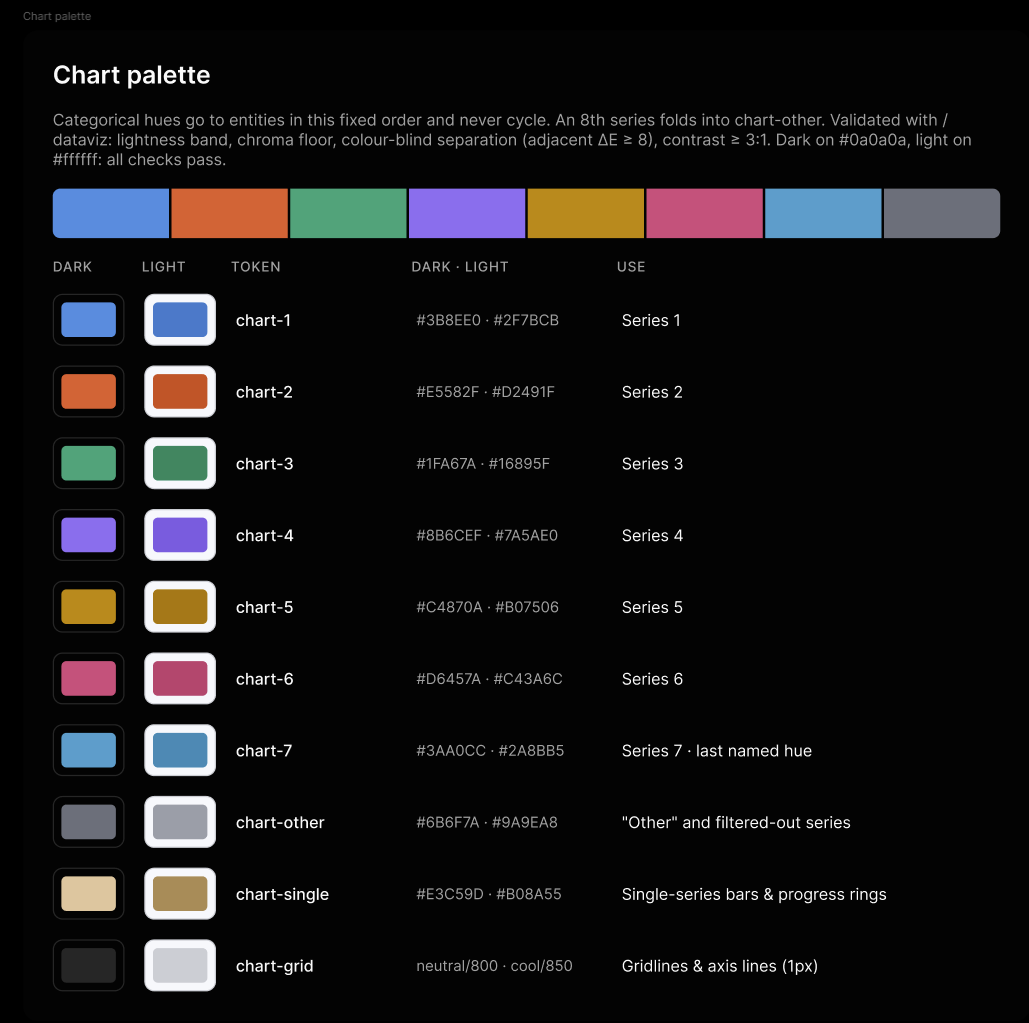
The chart palette in Figma. Each token with its dark and light value and what it's for.
I ran the palette through the dataviz validator instead of judging it by eye. Pink sat next to green, and for someone with red-green colour blindness the two were almost identical (ΔE 2.7, the target is 8). Amber and cyan were too light for the dark surface. I reordered the hues and darkened amber slightly. Every check now passes, in dark and in light mode.
Show the PR annotation for Charts
The usage audit charts live inside one screen and use hex colours. The palette failed a colour-blind check (pink next to green, ΔE 2.7). The next feature that needs a chart would start from scratch.
Figma: Design-System › Charts: 12 component sets, the chart palette board, and two example screens (Overview, Per model) built only from the components.
- Tokens in
index.css, light and dark: re-point--chart-1…5; add--chart-6,--chart-7,--chart-other,--chart-single,--chart-grid - Base: shadcn
components/ui/chart.tsx(ChartContainer,ChartTooltipContent,ChartLegendContent), with a config that maps each series tovar(--chart-N) - New wrappers on Recharts: AreaChart, DonutChart, RadialProgress, StackedColumnChart, DotPlot, BarListRow, MeterRow, StatTile, ProviderListItem, ChartCardHeader
- Usage audit screens swap hex colours for the tokens
- A Charts section on
/design-system, and entries incomponents.md
- Amber is slightly darker and cyan slightly stronger; pink and green are no longer neighbours
- A model or provider keeps the same colour in every chart
- Clicking a model in the donut filters the spend chart to that model
- Every chart with two or more series has a legend; Soft limit shows an icon and a word
validate_palette.jspasses in light (on #fff) and dark (on #0a0a0a)- Filtering never repaints the remaining series
- Hover tooltips show day, model and credits; gridlines and cursor use tokens in both modes
- Provider #8 onwards folds into “Others”
- Hues go to entities in a fixed order and never cycle
- Text never wears the series colour; the swatch beside it does
- Area fills fade 28% → 0%; no dots or animation on lines
- Gridlines are 1px solid, not dashed as on the shipped screen
- Stacked columns: one hue per provider, families as 100 / 60 / 32% steps
How an engineer uses it: tokens, not hex codes
<Area type="monotone" dataKey="opus" stroke="var(--chart-1)" fill="url(#fill-chart-1)"
      dot={false} isAnimationActive={false} />   // fill fades 28% → 0%
Outcome
Designers and engineers now pick the right component for what they're building, instead of rebuilding it or guessing. Because Figma and the code share the same names, tokens and variants, connecting an updated design to Claude Code was easy: it built the change efficiently and correctly, with the same component, the same prop and the same token.
What I learned
Make it visible first
The UI library page turned a vague feeling into something the whole team could point at. Every later decision came back to it.
Ask why before you fix
Some differences had good reasons. Asking the engineers who built them told me which to merge and which to keep as a token or a variant.
Fix it once, at the root
Because components only use tokens, changing the red once updated every button, example and screen that uses it.