Summary
Everyone starts small on a node canvas and nobody stays small. A workflow that began as six nodes is sixty by the time it ships, and coming back to it a fortnight later is genuinely hard, even for the person who built it.
I designed the subflow node. It takes a connected section of a graph and folds it into one node, and the parameters that matter can be surfaced on the outside of that node, so you adjust it without going in. Sixty nodes becomes ten.
It solved a second problem nobody had framed as a design problem. A supervisor can build something complicated, fold it, and hand it to a junior artist as a node with three sliders on it, instead of handing over a network they have to understand first.
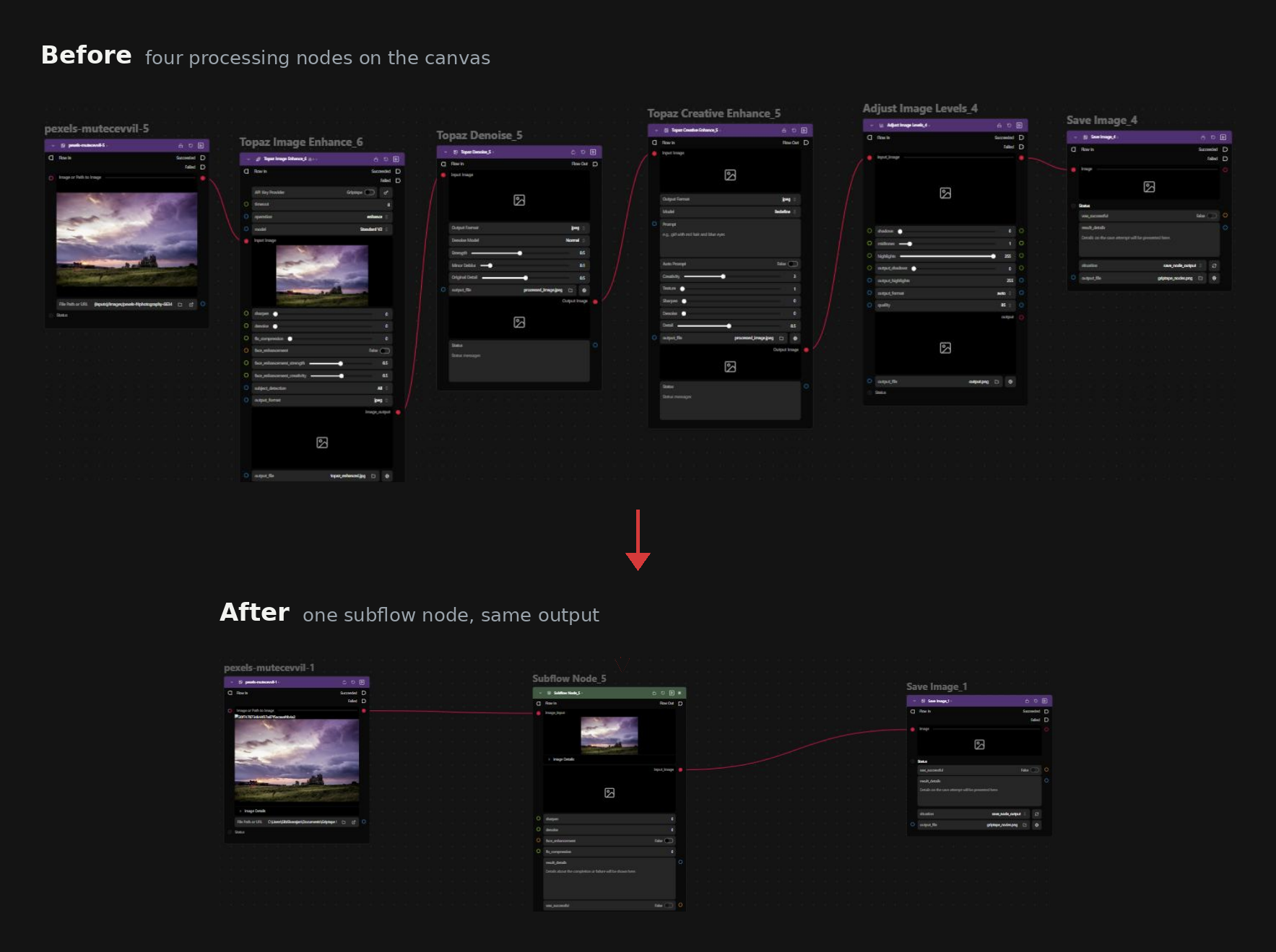
Before and after: four nodes folded into one, same output.
Problem to solve
Graphs grow, and a studio's graphs grow fastest. By the time a show is running, the workflows that matter are large enough that maintaining them is its own job.
People were already coping by hand, with layout, colour and comment boxes. That works until somebody else opens the file, and in a studio somebody else always opens the file.
Underneath that was a second problem. When a supervisor wanted to give an artist a way of working, the only thing they could give them was the whole graph. There was no way to hand over the capability without also handing over the complexity.
What I found out
Studios said the same thing. Big graphs, hard to maintain, and no way for a lead to pass work down without passing down everything.
Watching beat asking. People were not trying to hide complexity. They were trying to label it. The comment boxes and colour coding were attempts to say this group of nodes does one thing, and here is its name. Folding is what happens after you have named something.
Competitors already fold nodes. So the question was what to do differently.
I aligned with Nuke. Nuke is Foundry’s own compositing tool, and the people we were designing for use it every day. It has group nodes, folding and promoted parameters, and that mental model is already in their hands. Borrowing it meant the feature felt familiar to them from the start.
Where it differs from competitors. We made it a publishing system. The person who creates a subflow decides what happens to it: keep it, export it, publish it. The person who receives it decides how they take it, as their own copy or as a reference that stays tied to the original.
Design decision 1
A separate tab, not an inline expansion
Folding was the easy half. Select the nodes, right click, convert to subflow. The hard question was how you get back inside.
Two options. Expand the node in place, so the graph opens out and you rewire inside it. Or open it as its own tab, reached from an icon on the node header, with a breadcrumb back to the root.
Inline expansion is the friendlier idea and it is what you reach for first. It breaks at the size these graphs actually reach. Expanding a subflow inside an already large graph pushes everything around it, and the author spends their time panning and dragging rather than working.
The option I did not ship: expanding the subflow inline, inside the graph.
So editing happens in its own tab, with a breadcrumb showing where you are. The graph you came from stays exactly as you left it.
What shipped: the subflow opens in its own tab, with a breadcrumb back to the root.
But I kept a quick look. A button on the node flips it open to show what is inside, read only. Most of the time you do not want to edit, you want to check. Making the cheap question cheap meant the expensive one could be a tab away without anyone minding.
What it cost. A context switch where an inline expansion would have kept you in place. Worth it, and testing with internal artists showed why: their graphs are large, so an inline expansion has no room to work in. A separate tab also means a subflow can contain a subflow, and the breadcrumb handles any depth; inline expansion would have collapsed under the first nested one.
Design decision 2
Inputs and outputs are a rail, not nodes
A folded node needs input and output nodes inside it. That is how the parameters crossing the boundary get connected, and it was the default behaviour before I touched it.
The problem is that an artist opening a subflow sees them as two more nodes in the graph, when they are really the edges of the thing you are inside.
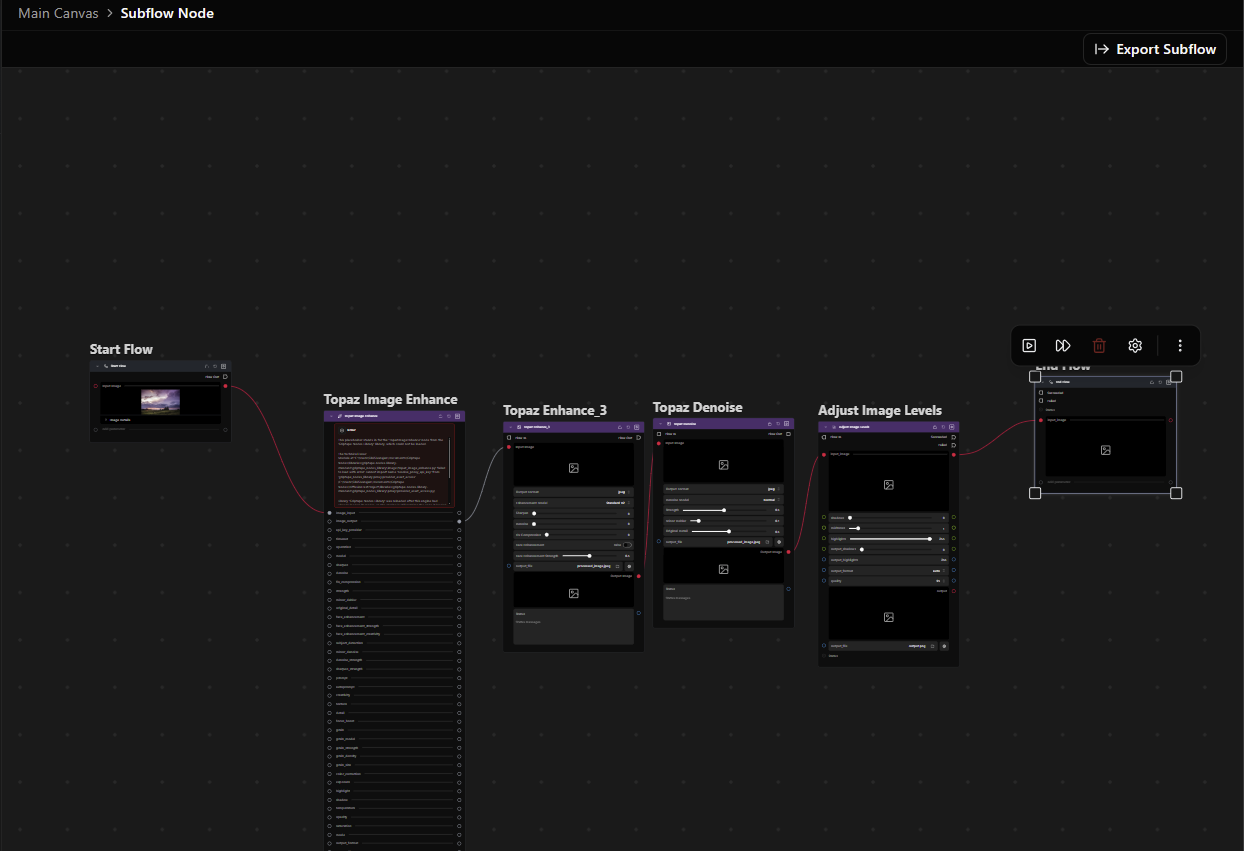
Before: Start Flow and End Flow as ordinary nodes at each end of the graph. The artist had to wire them by hand for the subflow to work, and when they forgot, it failed with an error.
I explored several versions with Claude. A minimised node. A docked panel. A sidewall you drag wires from.
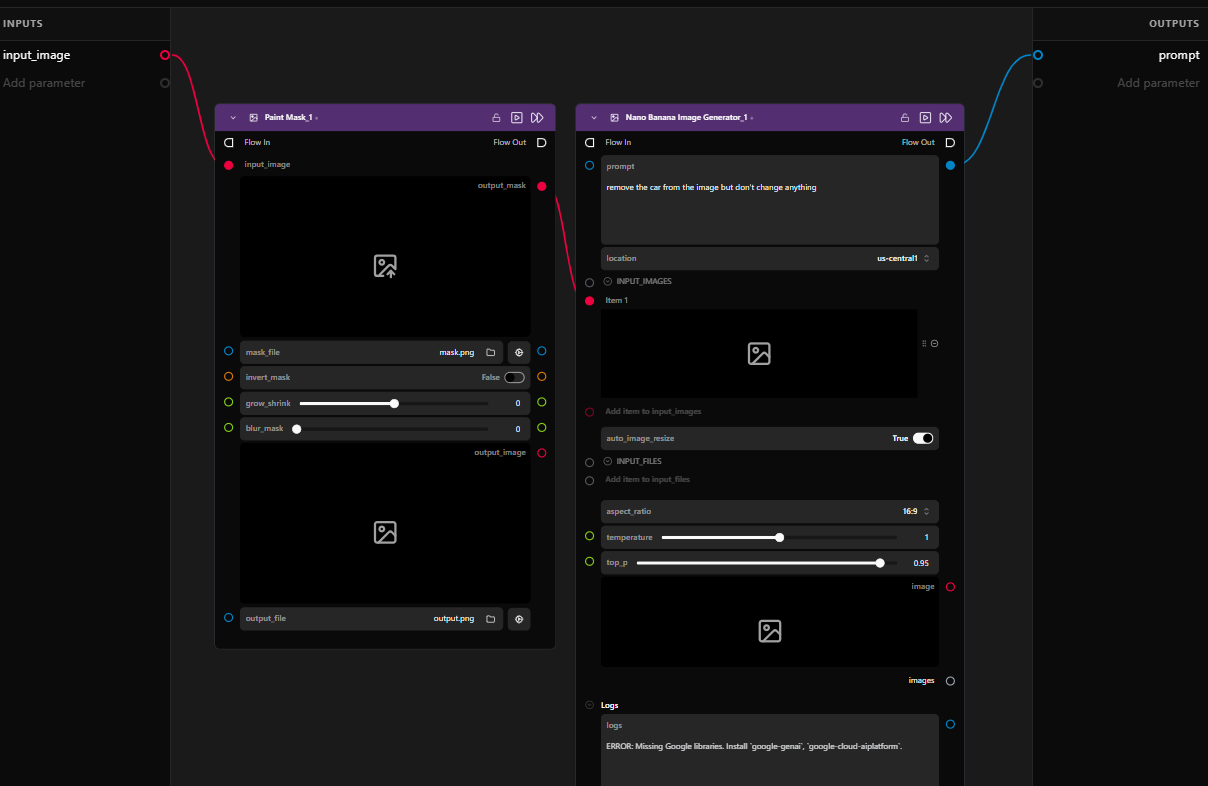
Explored: inputs and outputs as a sidewall at each edge. The backend stayed the same. Drag a wire from any node, drop it anywhere on the wall, and it connects, so the boundary was hard to forget. The interaction worked, but the walls took a lot of space that people did not always need.
What I landed on was a rail that pins. Pinned, it leaves the canvas and sits in screen space, fixed to the left and right edges, and the graph pans underneath it. The connection point you need is always where you left it, however far you have scrolled.
Unpinned, it drops back into the canvas and behaves like anything else in the graph.
So the same object works both ways: a fixed edge of the workspace when you are wiring a boundary, and an ordinary part of the graph when you are not.
Shipped: Start and End become simplified nodes, pinned to the left and right edges by default. They sit above the graph in screen space, so panning never disturbs them, and they unpin to behave like any other node.
What it cost. One more concept, pinning, in a canvas that already has plenty. I took that over two nodes that pretend to be nodes and are not.
Design decision 3
Copy or reference, depending on who you are
Two scenarios came out of the research and they want opposite things.
An artist building for themselves folds something they made, reuses it across their own project, exports it, brings it back later. They own it. If they change it, it changes.
A supervisor publishing to a team wants the opposite. The artists get the thing, the artists do not edit the thing, and when the supervisor improves it the artists get the improvement.
One is a copy. The other is a reference.
So both exist, and the decision is split between the two people involved.
Creator · create and export
Versioned automatically: {destination folder}/{node_type_name}{_v###}.py
Consumer · import as a copy
Consumer · import as a live reference
A reference can also change its file path, or detach from the live subflow.
The creator does not have to worry about how their subflow will be used. They export it to disk, to a path that projects scan for subflows, and choose which project it is saved to.
The consumer decides how to take it. Import it as a copy and the nodes become theirs: they can open it, edit what is inside, build on top of it, and export the result as a new subflow node.
Import as a copy: the subflow becomes the artist's own, to open, edit and build on.
Import it as a live reference and it stays tied to the file on disk. Its contents are frozen, so nobody edits it by accident. To change it, the artist has to make a deliberate choice to unfreeze it and override. Inside a studio, that choice is gated by permissions: only leads and supervisors can edit the contents of a referenced subflow.
The node header says which state a reference is in. Frozen while it follows the file, Live once it is unfrozen, and Unsaved as soon as something inside is overridden. A copy carries no badge, because it is simply the artist's own node.
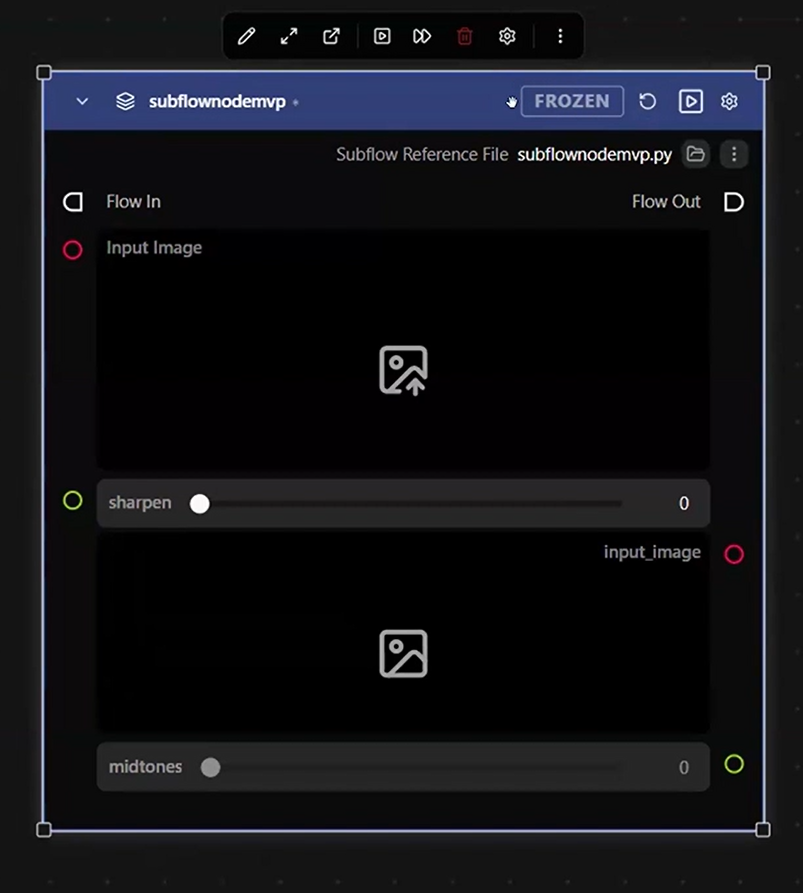
A referenced subflow, frozen, with its source file named under the header.
Import as a live reference: tied to the original, frozen until someone with permission unfreezes it.
What it cost. A copy drifts. Fix the original and every copy keeps the old version until someone updates it by hand. That risk sits with the artist who chose a copy, and they chose it because they wanted to own it. A reference stays correct, but it can change under people who were not expecting it. I kept that risk for studio work and contained it: referenced contents are frozen, unfreezing is a deliberate step, and only leads and supervisors are allowed to take it.
How it got built
I usually work on the frontend of Griptape Nodes. The nodes engine backend is a separate codebase with its own main. For this feature the timeline was short and it had to be done and tested, so I learned the backend from its documentation with Claude's help, took a branch there as well, and built both sides.
01 · Step in
A branch on each side, frontend and backend
One branch in the frontend codebase and one in the separate nodes engine backend.
02 · Learn the backend
Backend documentation, with Claude's help
Read the engine's documentation with Claude, plus two days of direct guidance from a backend engineer. A subflow could be a node, inside machinery that already worked.
03 · Build
Backend behaviour and canvas interactions
Built with Claude Code, which let me try many versions of the interactions on the node.
04 · Test
A working prototype in the team's hands
Because it actually ran, teammates could use it and tell me how it felt.
05 · Ship
Pull requests, review, merge
My first pull requests on the engine backend, raised with an engineer's guidance. Took the review comments, made the changes, merged to main once approved.
Outcome
Tested with the people who build these graphs for a living, and what came back was time.
They now fold a subflow for each part of a workflow they keep needing, and reuse it, instead of rebuilding the same section from scratch every time.
What I can say is what the people using it said while they were using it.