Case Study 1 · Permissions, budgeting and usage audit
AI PlatformPermissions and GovernanceEnterprise
Deciding what an AI system is allowed to do
Summary
Context
Foundry acquired Griptape, a startup building Griptape Nodes, an AI workflow platform for VFX pipelines. I was brought in to work with the Griptape team.
Problem
Griptape had no permission layer. Studios would not let the product near unreleased film work, because there was no way to control who could use it, which AI models they could use on which show, or what it cost. Banning AI had not worked for them either: artists kept using it, and the studio just stopped seeing it happen.
What I did
I designed the admin layer that let a studio say yes safely: licences, access groups, model permissions per show, usage and spend, and delegated admin. It rests on one decision: a permission template says what kind of place it is before anything else, so an administrator can see what a setting will actually do.
Outcome
Governance was the objection ending sales conversations. After it shipped, they went further.
Product
Griptape Nodes
Users
VFX studios, pipeline supervisors, studio admin
My role
Research, design and frontend build
Timeline
3 months
Team
Product manager, engineers, designer
Context
Griptape Nodes
Griptape Nodes is an AI workflow platform for VFX and creative pipelines. Artists build on a node canvas. Artists are not the buyer though. Studios are, and a studio buys for a show.
The problem
The product worked. The sales conversations kept stopping in the same place.
A studio would say the same three things. We need to licence only the artists and groups on this show, not everyone in the building. We need to allow certain AI models on certain projects and block the rest. And we need to know what the models are costing us per production before the invoice turns up.
None of that existed in the product.
For a VFX studio that is a reason not to buy. They are contractually responsible for protecting unreleased film work, so a tool that cannot say who may touch what, on which show, with which model, is a tool they cannot put near the material.
The harder version of the problem is that refusing AI does not work either. A studio that bans it does not stop artists using it, it stops seeing them use it, and now unapproved tools are touching footage under an NDA. My colleague Collin Dutter put it plainly in his ASWF Open Source Days talk on the same product: you cannot ban your way to control. Shadow AI is a compliance event.
So the design problem was how to let a studio say yes without losing the ability to prove what happened.
What I found out
01 · People
What the people told me
Pipeline supervisors and studio IT, the people who would hold these controls, rather than artists.
Protect the output
The film is not out yet. Any image an AI model creates from its footage is just as confidential as the footage itself, so studios need to protect what the AI makes, not just what goes in.
Artists move
Nobody sits on one show for a year any more. What keeps a security lead awake is an artist who changed production last week and still has access to the one before.
No single setting
A junior learning the tool should have everything open, because trying things is the point. A show in production should have everything closed with a few things allowed. Both are correct at the same time, in the same building, so one global answer was never going to work.
Contractors
They are not employees. They are on one show for a fixed stretch, and their access should end when that does.
Licences are not permissions
Studios were happy to hand a licence to everyone. What they wanted was control over what each person, group and project could do with it, down to something like the compositing team being allowed certain models and not others.
Auditability
They don’t trust what they can’t check afterwards. Being able to see why a decision came out the way it did mattered more than the decision being clever.
More than one admin
One person being the only administrator at a studio was a dealbreaker on its own.
02 · Industry
What the industry had already settled on
Production tracking tools and the closest node based tools, read with AI.
Nothing to copy
No node based AI tool had permissions like this, so there was no direct comparison inside our own category. What studios did already have was production tracking, the software they run every day to decide who is on which show and who can see what. That is where the patterns lived, and the people who would hold our controls were already fluent in them.
AI did the reading
There is rarely budget to buy a seat on those products, so I had AI read their public documentation and user forums and lay the patterns side by side. What people complain about in a forum tells you more than a marketing page does.
Choosing was mine
Gathering is the part a model is faster at than I am. Access control in those tools is an old problem and mostly solved, so the useful question was not what to invent. It was which patterns studio staff already had habits around, and where the gap was real, because what we were permitting was not access to a file. It was the use of a model that costs money and touches footage under an NDA.
Nobody had solved it
ComfyUI, the closest node based tool, had no permission editor at all. The production tracking systems did have a permission model, but it came down to a grid of checkboxes. This artist yes, that artist no.
Two states is the problem
A checkbox cannot say “whatever the studio decided”, which is the state most rows should sit in, and it cannot show an administrator that a row was inherited rather than chosen. With a few users you never notice. With hundreds of models across a dozen shows, a screen of checkboxes stops being readable and nobody can tell which settings were deliberate.
The three state control
The pattern I needed was in neither place. That is where the three state control came from.
03 · Code
What the code told me
What the product already did, read from the backend rather than assumed.
A skill, not a manual read
A colleague on the team had written a UX flow template, so I turned it into a skill that reads the backend and returns what the product currently does in that same format, as task flows. That gave me a map of what existed rather than an assumption about it.
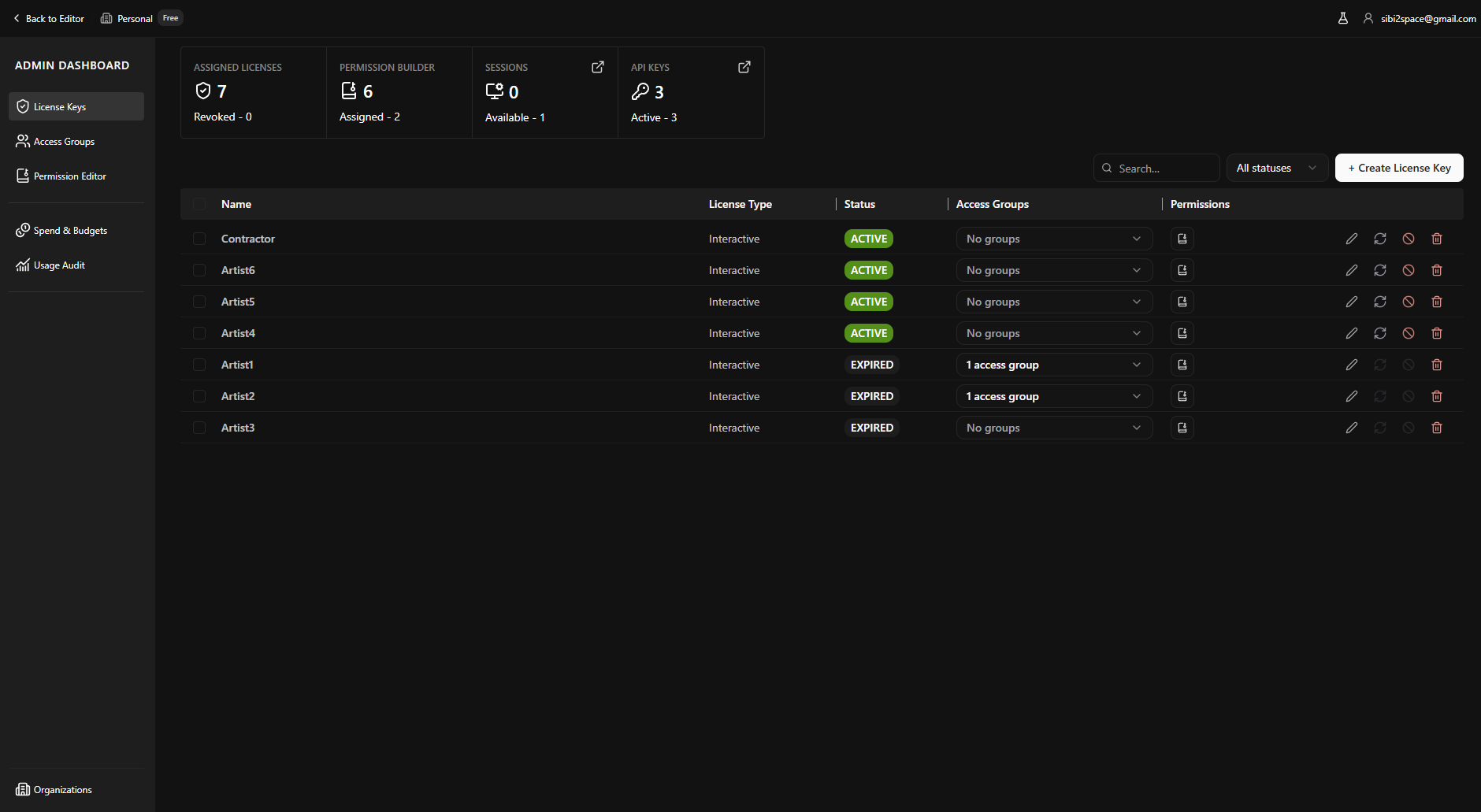
Licence keys existed
Creating them and assigning them to people was already there.
Enforcement existed
A mechanism could already stop a run outright when a licence or permission check failed, but it had one setting: everything or nothing. What studios were asking for was the middle.
Extend, don’t rebuild
The work was extending something that already ran rather than building a permission system from scratch, and that changed what was possible in the time we had.
The interviews told me what studios wanted. The code told me what I could actually give them. Most of the design happened in between.
Before any screens
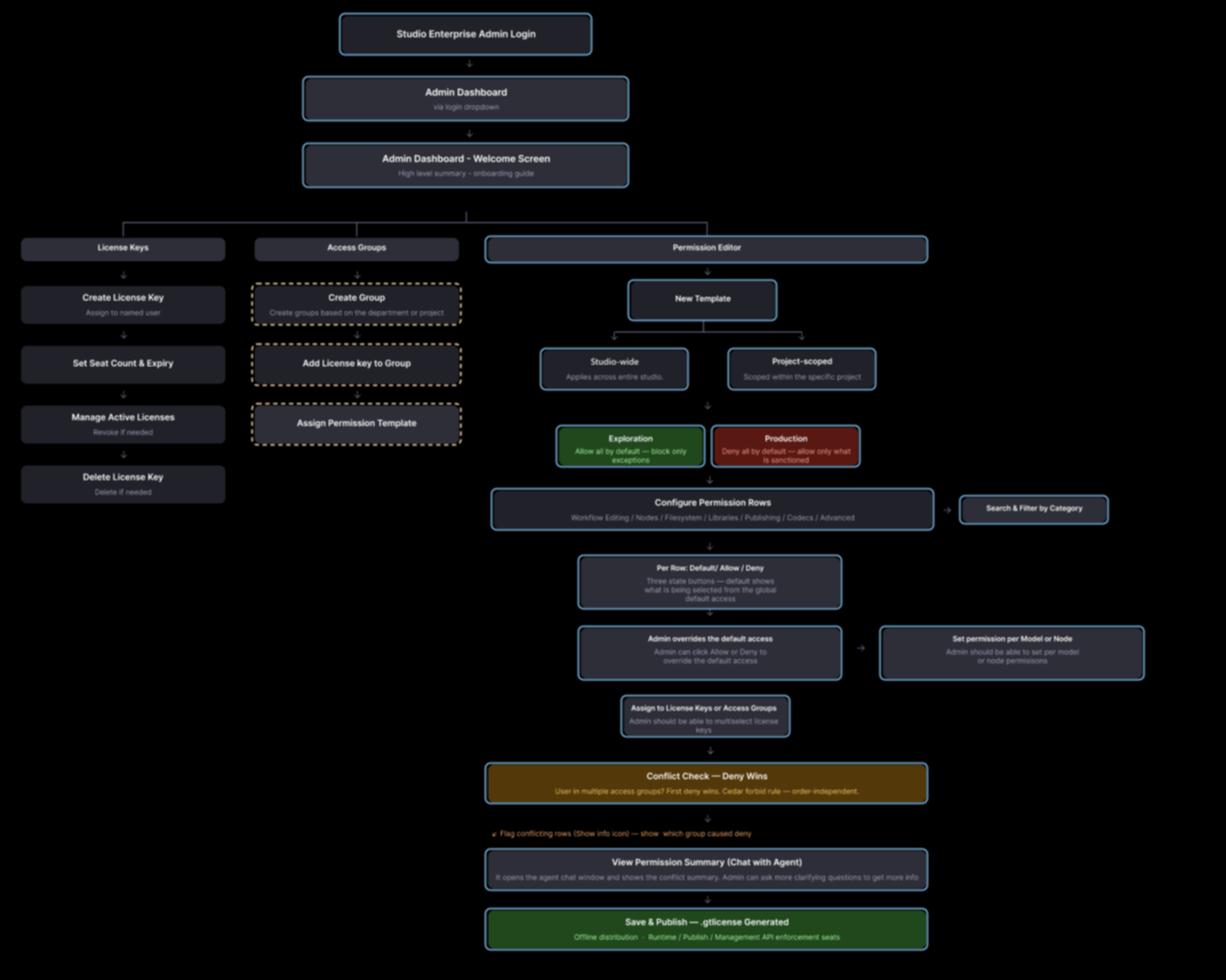
I put the research into one flow for the whole thing before drawing anything. It had three jobs: say what already existed, say what could be reused rather than rebuilt, and say what genuinely had to be new.
The flow: what existed, what was reused, what was new.
ExistedReusedNew
That told us what to build. It did not tell us what to build first, and building all of it before showing any of it meant months of work resting on an untested assumption.
The team set the order: permissions first, because nothing else matters if a studio cannot say who may use what.
I proposed what came after. Rather than moving straight on, we would show permissions at SIGGRAPH in July, using the frontend I built, and use the event to answer what we had not.
I also proposed what to ask. Not whether people liked it, but the three things we were about to guess at: whether studios needed to see what models cost them, whether they needed budgets that stop an overrun rather than report one, and whether one administrator was enough. If not, delegated admin became a condition of buying.
So the showing was the cheapest research we had, run on the two features we had not started.
01
Permissions
SIGGRAPH, July
02
Budgeting / usage audit
03
Delegated admin
Permissions was the only thing built before July. Budgeting, usage auditing and delegated admin were all built after SIGGRAPH, on the back of what we heard there.
In the rest of this case study, I walk through the three most important design decisions I made.
Design decision 1
Posture first, then exceptions
Problem to solve
Two scenarios came up every time I spoke to a studio admin.
A new artist needs everything open while they learn, on a licence that expires. A show in production needs everything shut, then two or three models opened back up because that project needs them.
Underneath both is the same problem. Griptape Nodes has hundreds of things you can permit across nodes, libraries and models, and the list keeps growing. Nobody was going to click through it row by row in either direction. Both scenarios are one bulk action followed by a handful of exceptions, and the product had no way to express a bulk action at all.
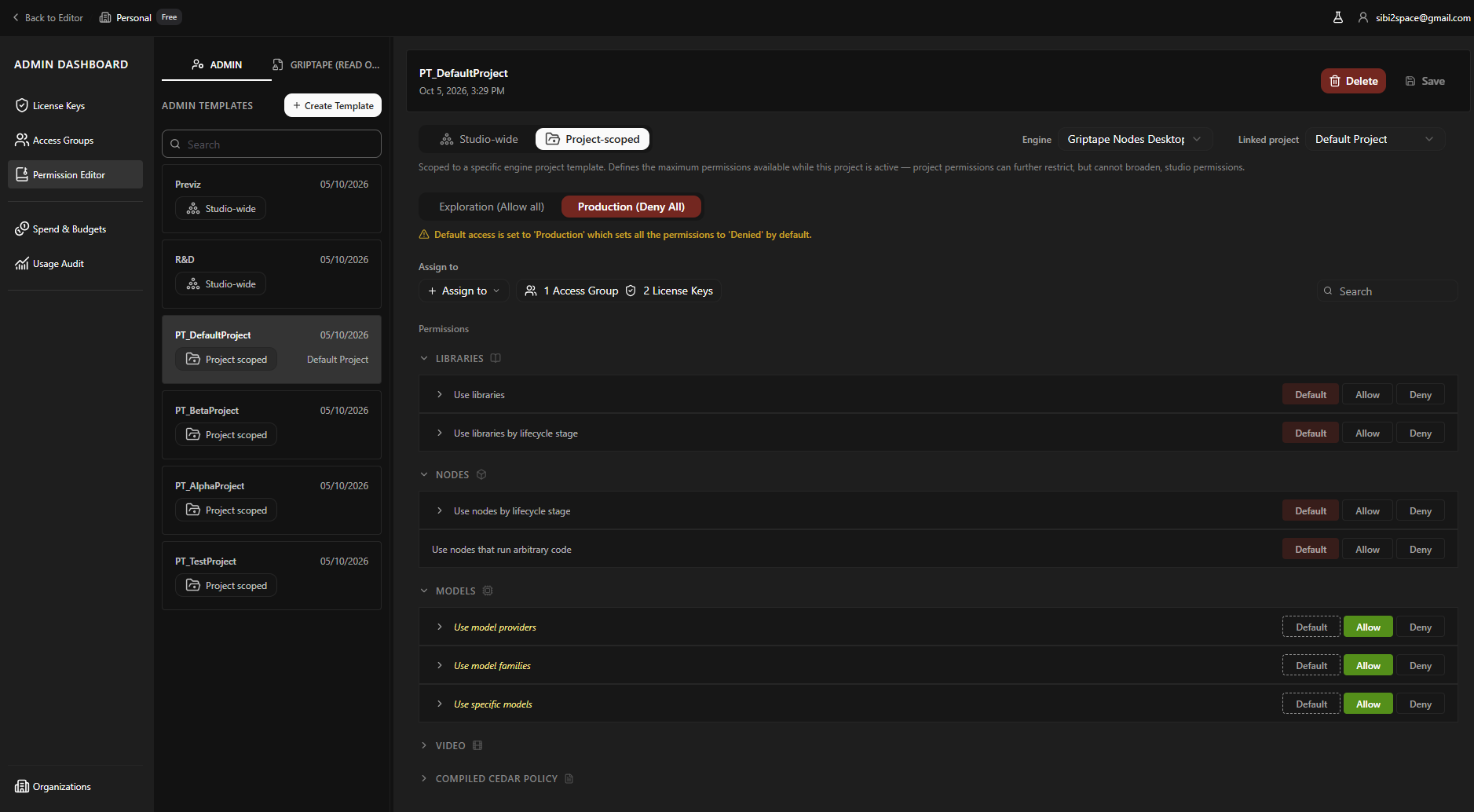
So the template had to say what kind of place it was before it said anything else. Exploration allows everything unless you refuse it. Production refuses everything unless you allow it. Every row below is an exception to the posture rather than a setting of its own.
What I explored, and what I threw away
The first version was a standard settings form. It worked, and it hid the only thing that mattered: you could not see what a template actually permits, conflicts only appeared after publishing, and no row told you where its rule came from.
So I did not start again by laying out a dashboard. I started with the single control the rest of it exists to support, the thing an administrator clicks to say whether a model is allowed, and generated a lot of versions of it quickly so I could put them in front of product and engineering and argue about behaviour instead of visual detail.
The first two options both failed on the same thing: with only two states, a row never showed whether a preset or a person had set it.
Option 1, a wizard. Defaults on one screen, exceptions on another, and still only Open or Closed.
Option 2, open and closed lists. Every dimension twice, so reading one state meant comparing two lists.
Allow and Deny, with a padlock for inheritance. The closest to the answer, and it failed the way the others did.
Option 3, the full template with Allow, Deny and a lock on every row.
Here is what broke. Under Production, every row says Deny. The one row an admin deliberately refused looks exactly like the hundreds of rows that are denied because the posture says so. The screen is full of state and none of it tells you which decisions were anybody's. An admin reviewing their own template before a client audit could not answer the only question that matters: what did we actually choose here.
The padlock was an attempt to patch that, and it made it worse. Now there were two controls on every row, one saying what the value is and one saying where it came from, and answering a single question meant reading both.
A drag-to-reorder priority list. A familiar permissions pattern, and every admin assumes dragging an allow above a deny makes it win. Our engine ignores order, so that interface would have lied, and the cost of a lying permission UI lands on the artist at 2am, mid-shot.
The decision
Three states instead of two, and the third is the one carrying the information.
Allow and Deny mean somebody chose. Default means this row is doing whatever the template decided. It is not a neutral middle and it is not "unset".
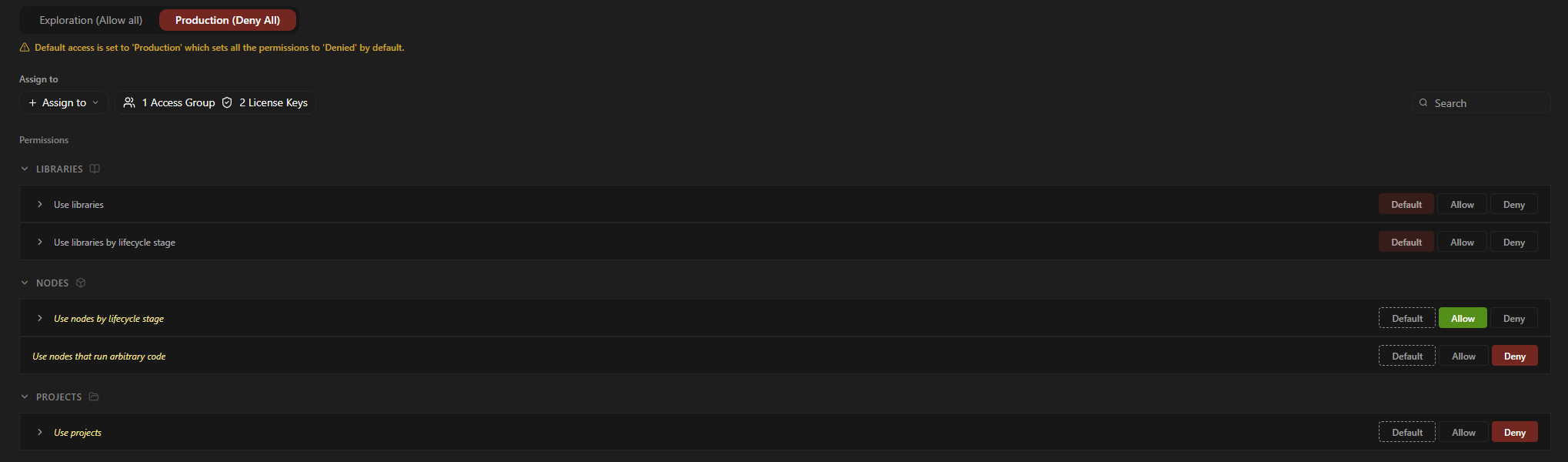
Default shows what it resolves to. It takes a muted version of the posture's colour, soft green under Exploration and soft red under Production, so an admin sees which rows they touched and which are following the posture without opening anything.
Under Production, Default reads as soft red while a deliberate Deny reads solid.
It had to cascade. A capability row expands into subcategories and admins add their own, so a template is a tree rather than a list. While a row sits on Default the posture applies to it and everything underneath it. Override it to Allow or Deny and that choice flows down too.
Subcategories inherit Default until the row above them is overridden.
The same control works at every level of that tree, so a template with hundreds of items stays readable.
No row changed. Only what the posture resolves to changed.
What it cost. Posture sits on the template rather than per category, so a studio wanting open libraries and locked models has to make two templates. I took that over a Default that means different things in different parts of one screen, which is not something anyone can explain to a client's security team.
Building outward from that one control
I built the dashboard with the real components and tested the flow end to end. The rest of the page came from questions the control raised: the posture switch, the conflict warning when two templates disagree, and the compiled policy panel underneath the builder.
Then the whole loop. The admin sets a template and attaches it to a licence. The licence becomes a token the admin copies and sends to each artist. Deliberately manual: a studio already has channels its security team has signed off, and an automated email would add an unvetted route out of a building holding unreleased film work. The artist logs in with that licence and works within what it allows.
Admin
Sets the template
Scope, posture, exceptions.
Attach
Licence
Carries the permissions
Sent to the artist by the admin.
Log in
Artist
Works in Griptape Nodes
Only what the template allows is available.
Denied
Node error
Sees why, and what to do
Contact admin, or view their permissions and carry on with what is available.
The admin sets the template, the licence carries it, the artist works within it, and a denied node tells them what to do next.
What the artist sees
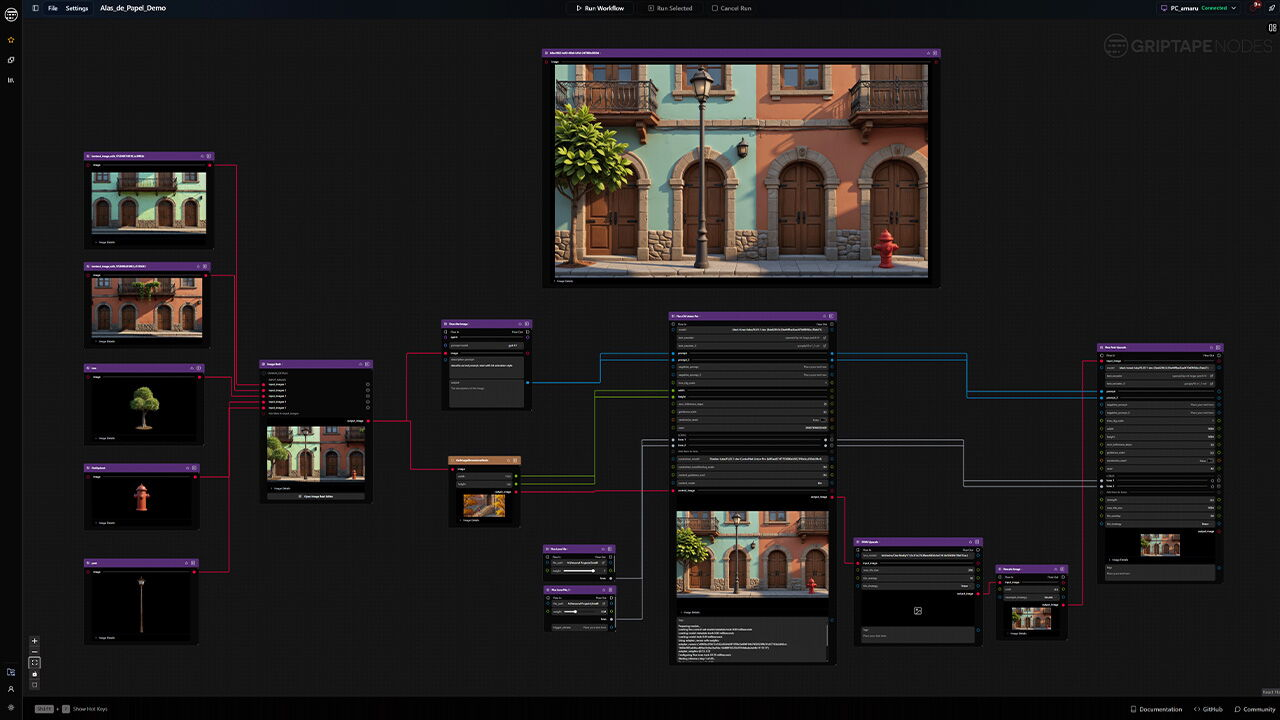
The artist never sees any of the above. They paste the token, open a project, drop a generative image node on the canvas, write a prompt and press run.
Everything in the permission model arrives in that one moment, as nothing happening.
So the refusal goes on the node, not in a toast, a log or a settings page. The thing that failed is the thing that explains itself, because the node is where they are already looking.
A node can fail several checks at once. Reporting them one at a time means a round trip to the admin for each, so every check runs and all the failures land in one panel, split by who can fix them.
And there are two reasons a node gets refused, which are not the same problem at all.
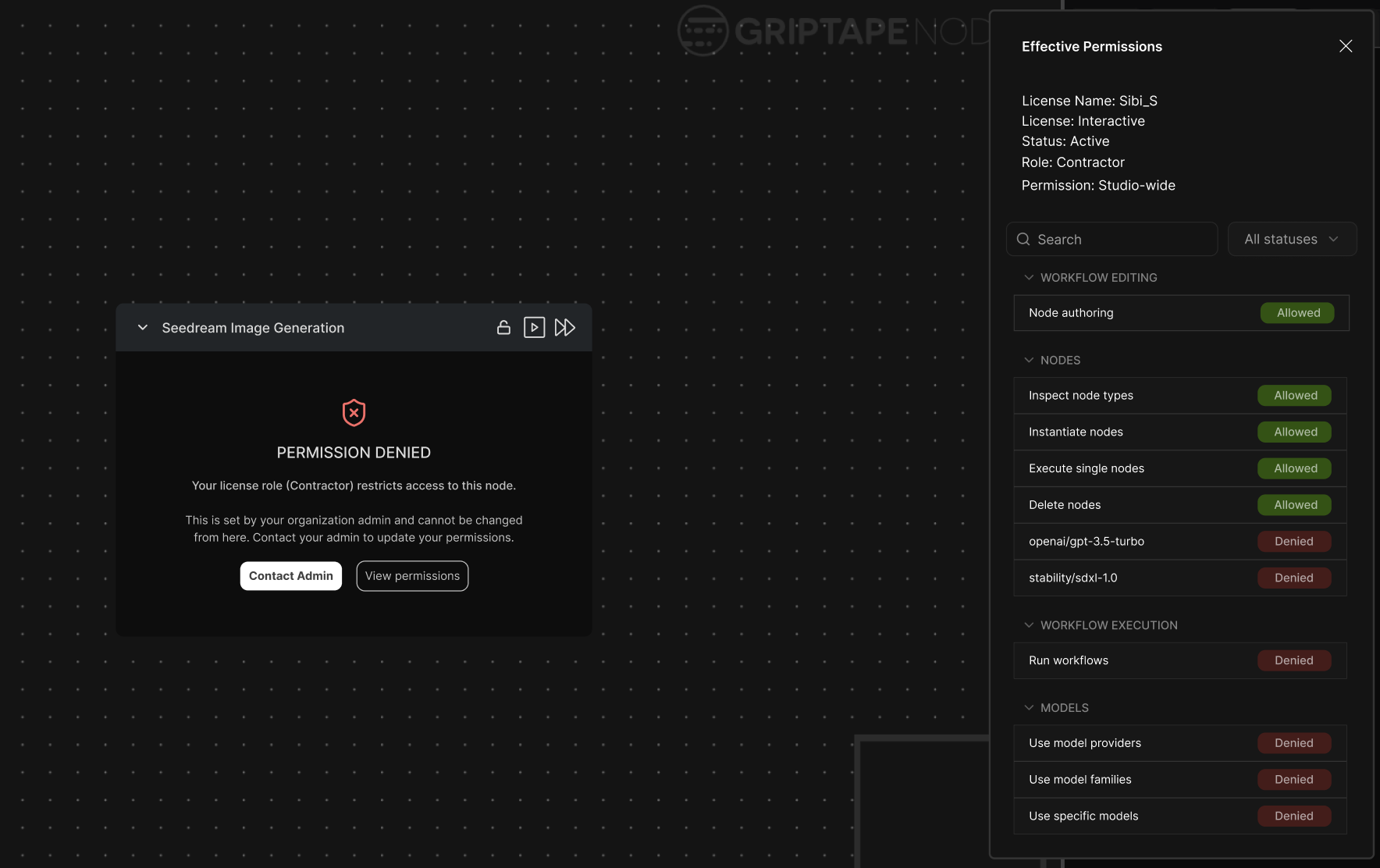
The studio denied it. Their own admin, their own template, so somebody in the building can change this. The node stays live rather than greying out, because it could become available. The message says who can help and carries a contact button.
From there the artist can open a read-only list of everything their licence allows and refuses. It stops them discovering their own permissions one blocked node at a time. They cannot change anything in it, which is the point. It answers what can I use, rather than opening an argument about what they should be allowed.
The admin-denied error on a live node, and the read-only permission summary it opens.
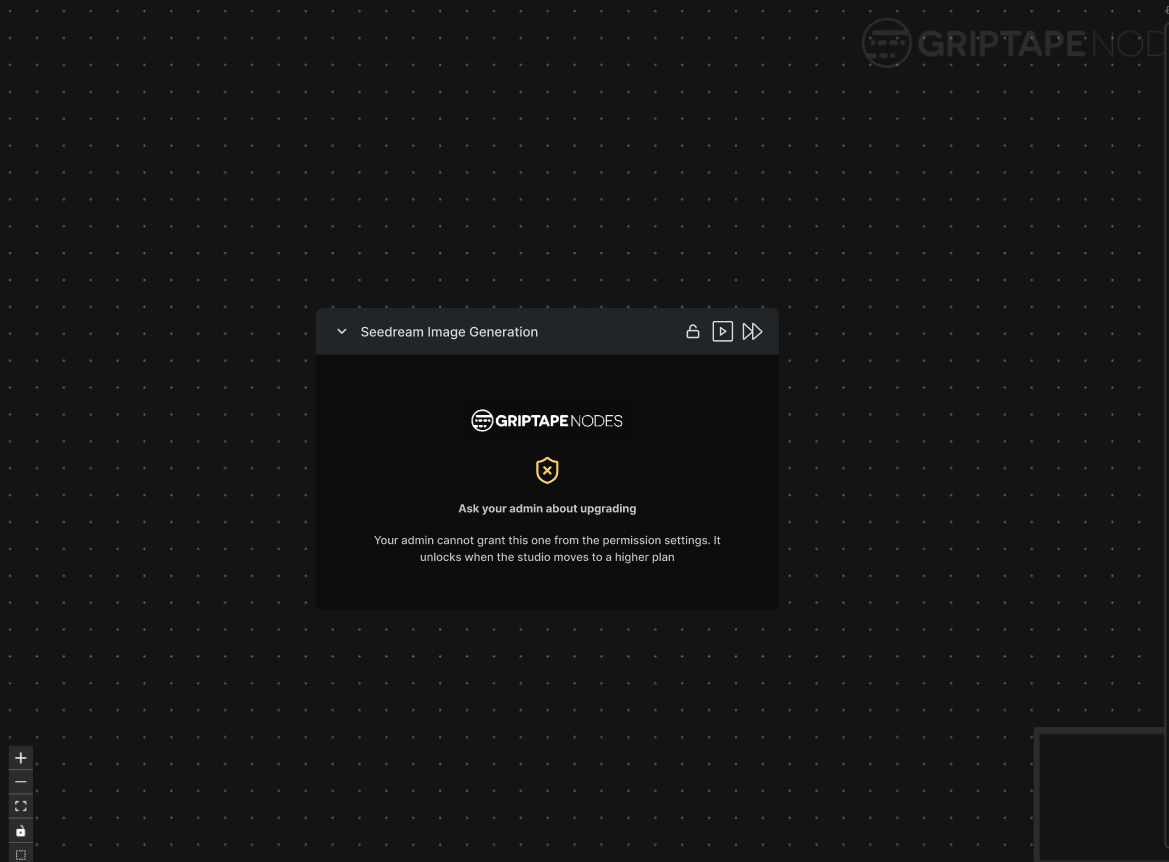
Griptape denied it. Either the studio has not bought enough credit for that model, or it sits above the tier they are on, so a mid-tier studio cannot reach something reserved for enterprise. Nobody at the studio can fix this one.
So the node is disabled, and clicking it shows the error with no contact button. The admin-denied error asks for permission. The tier error asks for budget. Those are two different conversations with the same person, and the error says which one to have.
The Griptape-denied error on a disabled node.
The node's own state carries the difference before anyone reads a word. Live means this could change and there is someone to ask. Greyed out means it will not change for you, so close it and get on with something else.
Design decision 2
Budgets that match how a project actually runs
Problem to solve
Admins described three kinds of project, and they were not variations of each other.
Hard limit
A short job
Gets a small budget. When it runs out the work should stop and the admin should hear about it, so they can top it up.
Soft limit
A long, important project
Stopping it is worse than overspending. If the money runs out at two in the morning and the admin is asleep, it keeps going, and they top it up when they are back.
Freeze
A project on hold
Not cancelled, and nobody wants to take its budget away, but nothing should be spent on it until somebody says so.
The first two are the same question answered differently: what happens when the money runs out. The third is not that question at all.
What I explored, and what I threw away
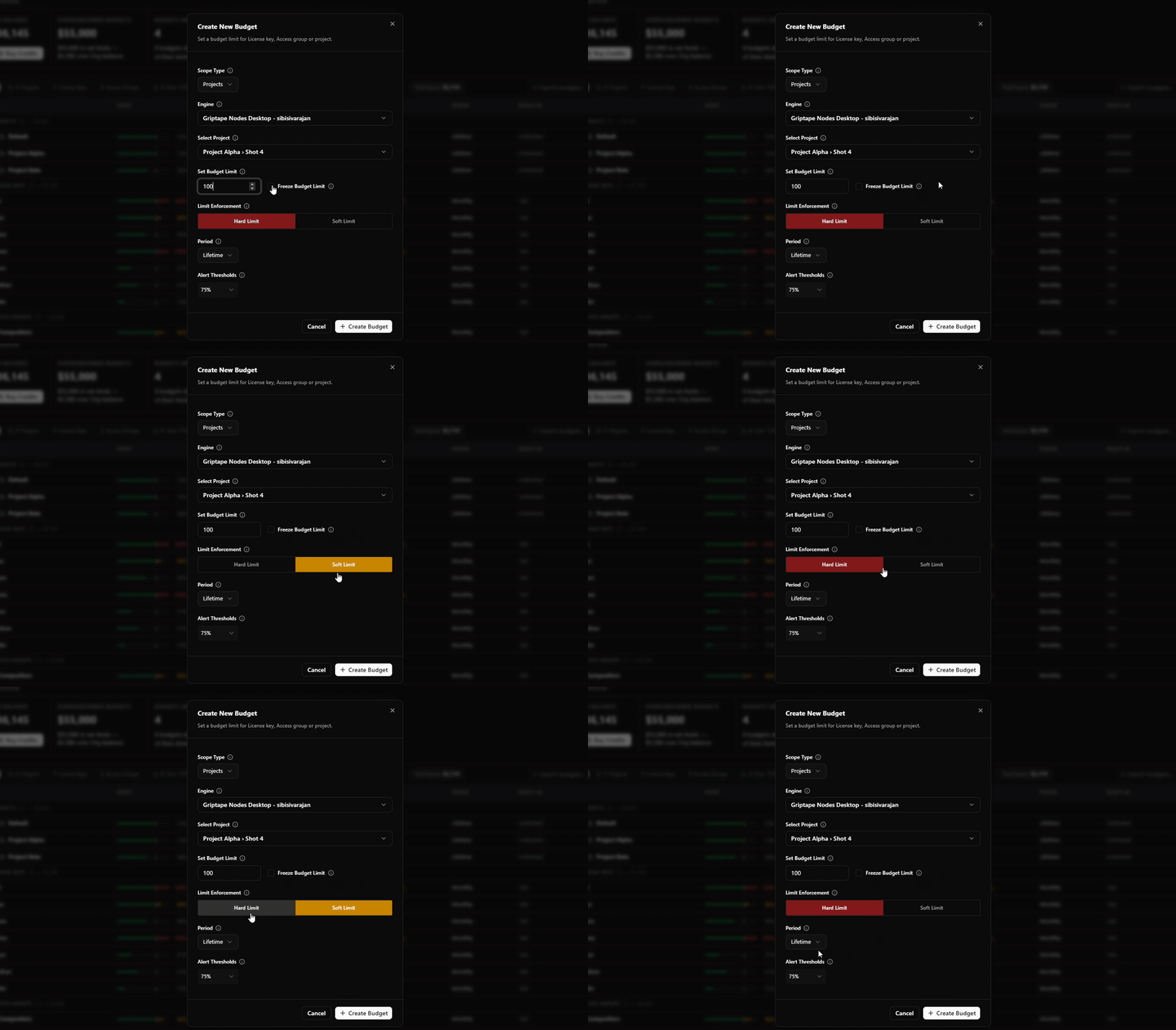
Three checkboxes. Hard limit, soft limit, freeze, tick what you want. It fell over straight away. These are not things you combine. A budget cannot be both hard and soft, and a checkbox invites an admin to try.
Version 1, the three checkboxes.
A three-option segmented control. Hard, soft, freeze, pick one. Better, because now it is one choice. I tried colour here too, red for hard because it stops, amber for soft because it warns and carries on.
Version 2, the three-way segmented control.
It still read wrong, and it took me a while to see why. Hard and soft are both answers to the same question: what happens when the budget is exhausted. The project runs, the money runs down, and then it either stops or it warns. Freeze does not wait for anything. It sets spending to zero now, whatever the budget says, and lifts again later. Putting it in the same control told an admin it was the third option in a series when it is really a switch sitting over the top of the other two.
The decision
Split the control so it matches the two different questions.
Hard or soft is a segmented control. One choice, because a project can only behave one way when the money runs out.
Freeze is a checkbox above it. Turn it on and the enforcement choice underneath stops mattering. Nothing spends, whichever way the segmented control is set, and the interface says so rather than leaving both controls looking equally live.
The final dialog: freeze as a checkbox, hard and soft as a segmented control beneath it.
The shape of the control is what teaches the model. Three equal options tell an admin there are three equal things. A switch sitting over a choice tells them one overrides the other before they have read a word of help text.
Making it readable when there are hundreds
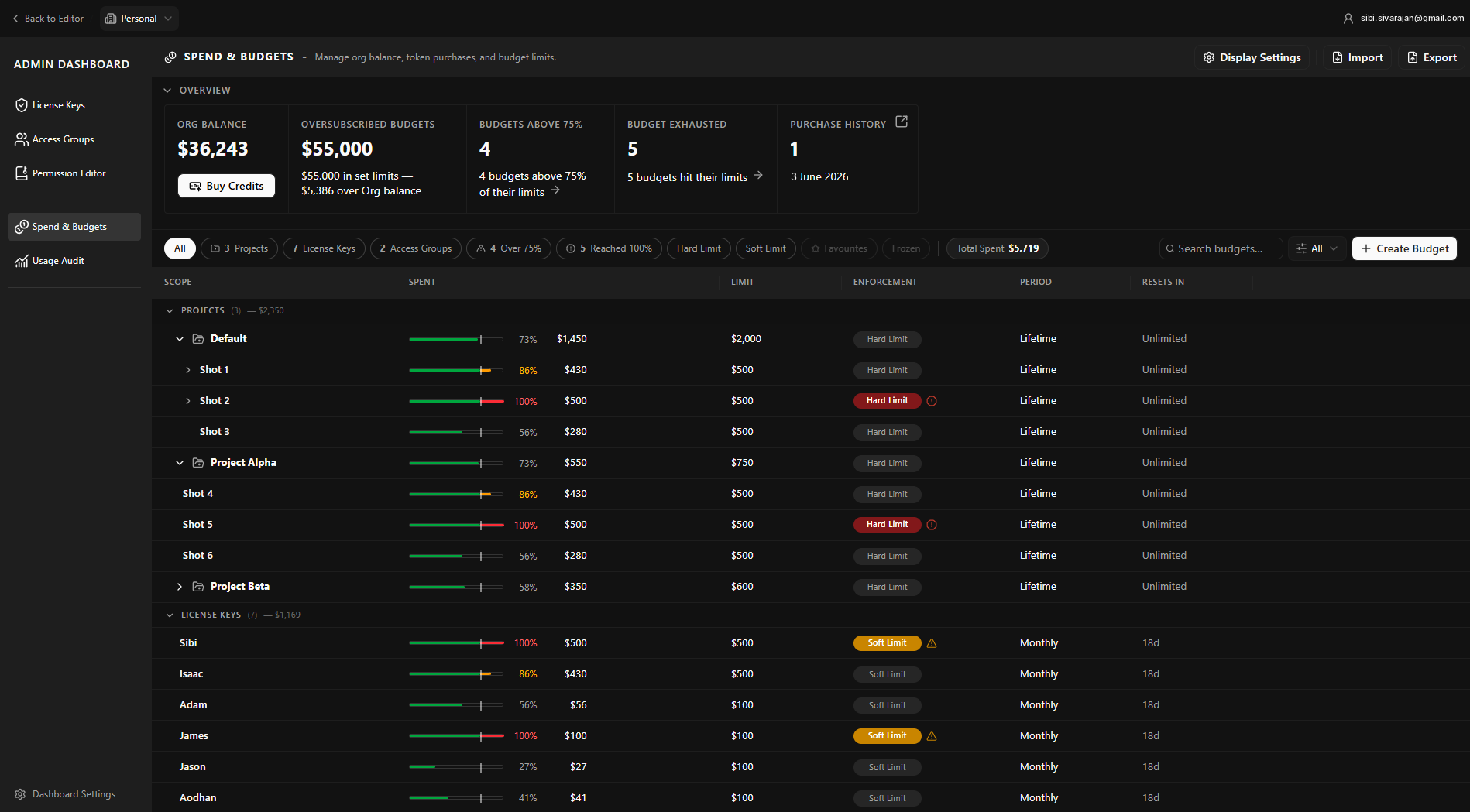
A budget gets created once and then looked at for months, usually in a long list. So the row had to carry what the dialog knew.
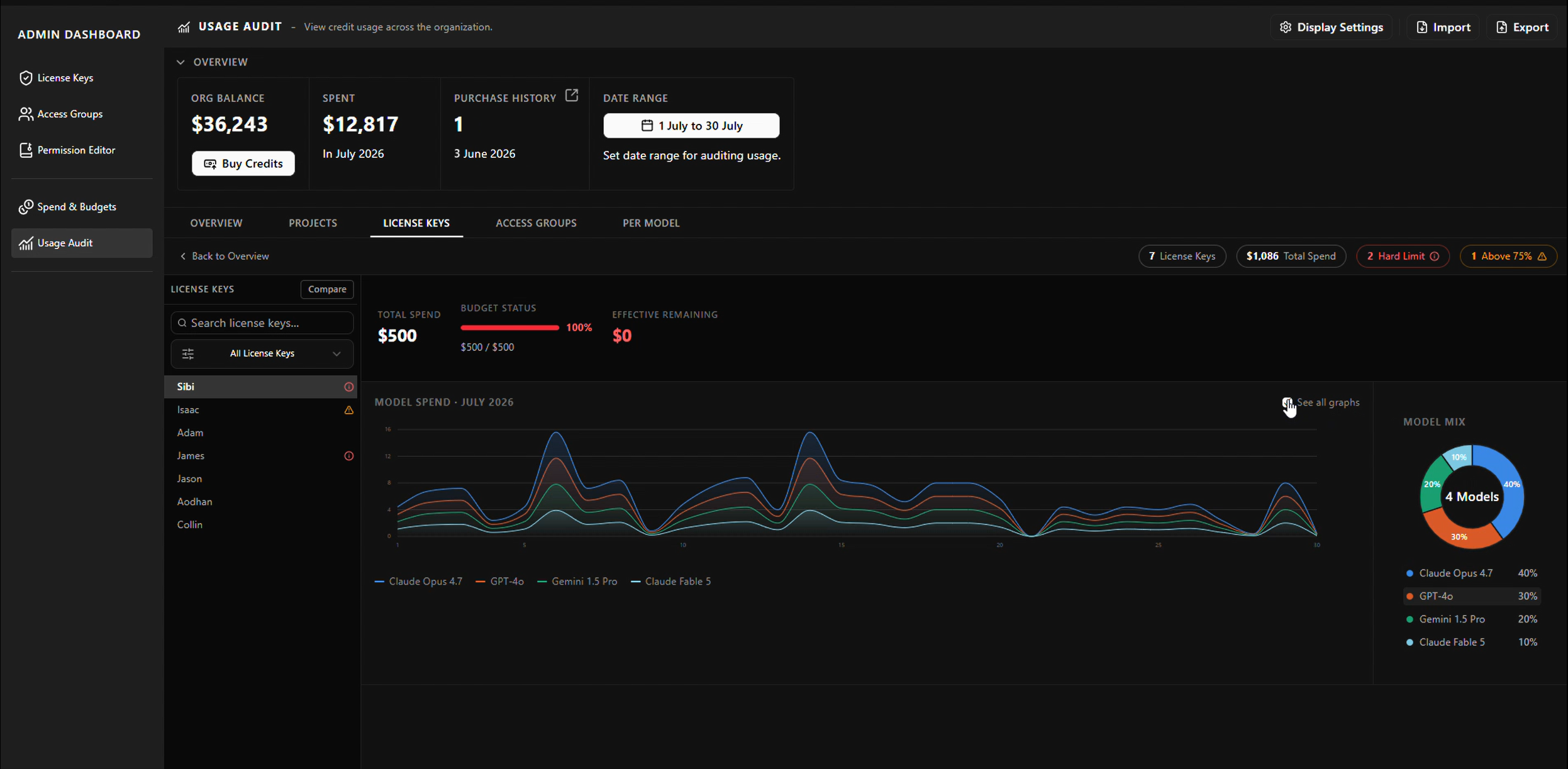
A progress bar on every budget, with an alert at 75 per cent and an email to the admin, so topping up is something you plan rather than something you discover.
Colour at the limit that matches the enforcement. A hard limit at 100 per cent turns red, because it stopped. A soft limit at 100 per cent turns amber and keeps filling, because it did not.
A chip on the row saying hard or soft, and a filter on it, so an admin holding hundreds of budgets can pull up every soft one before a quarter closes.
The budget list: progress bars, the alert state at 75 per cent, and the chip and filter.
What the artist sees
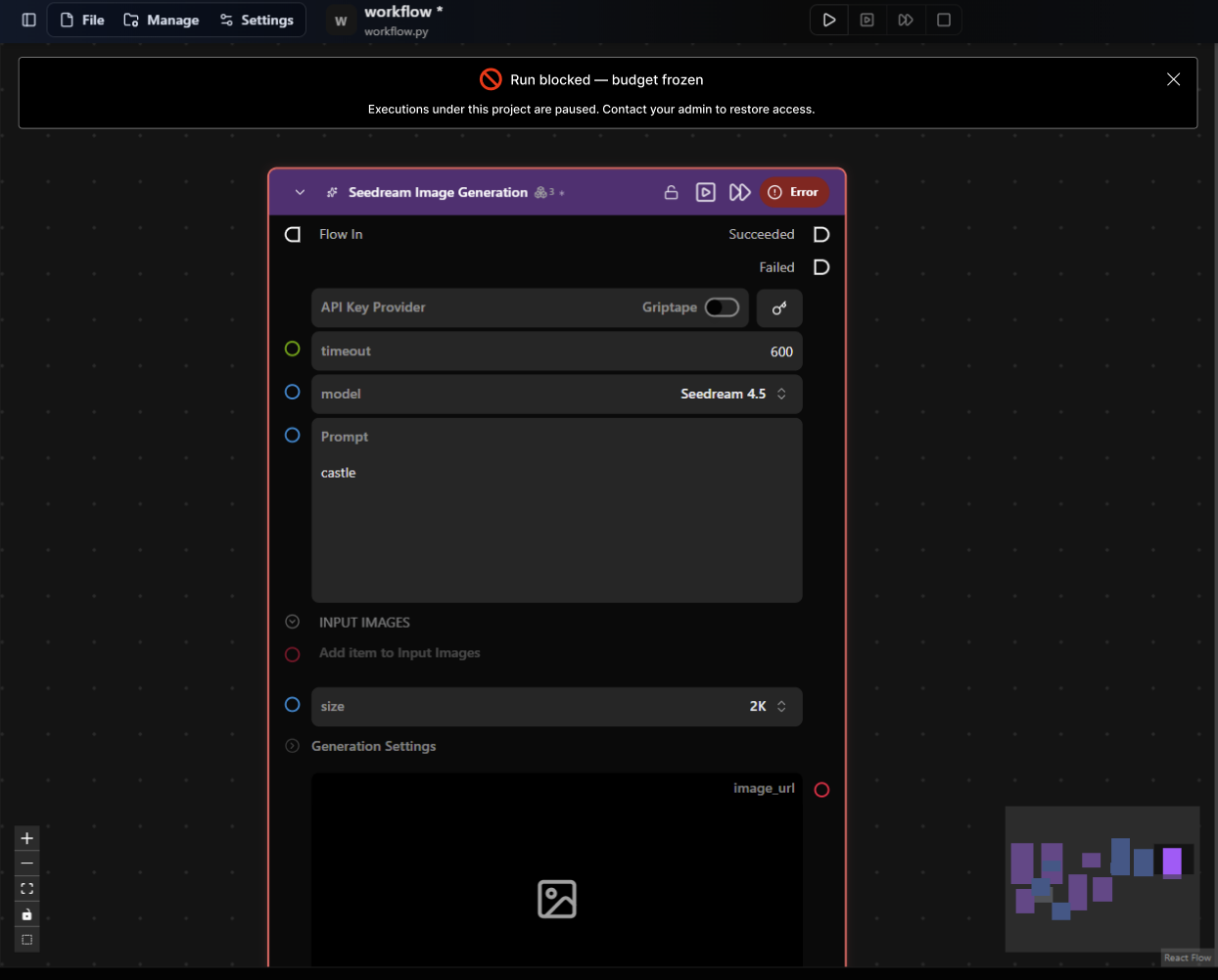
When a project is frozen or out of budget, nothing runs. Not one node, all of them.
So this message does not go on a node. It goes on a bar across the top of the node graph, because the problem is not with the thing the artist clicked, it is with the project they are working in. Putting it on the node would mean saying it once per node, and would suggest the node was at fault.
The message says which it is, frozen or out of budget, and to contact their admin. The point is that the artist does not sit there pressing run and wondering what is broken.
The message bar across the top of the node graph.
Design decision 3
Bring your own key, without building a second system
Problem to solve
Studios pay for models two ways. Either through Griptape credits on the models we proxy, or by bringing their own API key from a provider and paying that provider directly.
Admins wanted both in one place. A studio budgets per show and does not care whose key paid for a frame. With half the spend sitting outside the dashboard, the other half was not much use.
What was on the table, and what I did instead
The plan was a separate flow: export usage from the provider and upload it into the dashboard. It is the obvious answer and it would have worked. I took it to the engineers before I started designing it, and the data was already there. Those calls run through our backend even when the key belongs to the customer. Nobody had connected that fact to the dashboard question.
The planned flow
Admin exports usage from their provider and uploads the file
A second data model, an import format and an upload screen
Error handling for a file that does not match
A number only as fresh as the last time somebody remembered to export it
What I proposed
Own-key usage collected automatically, from calls we already see
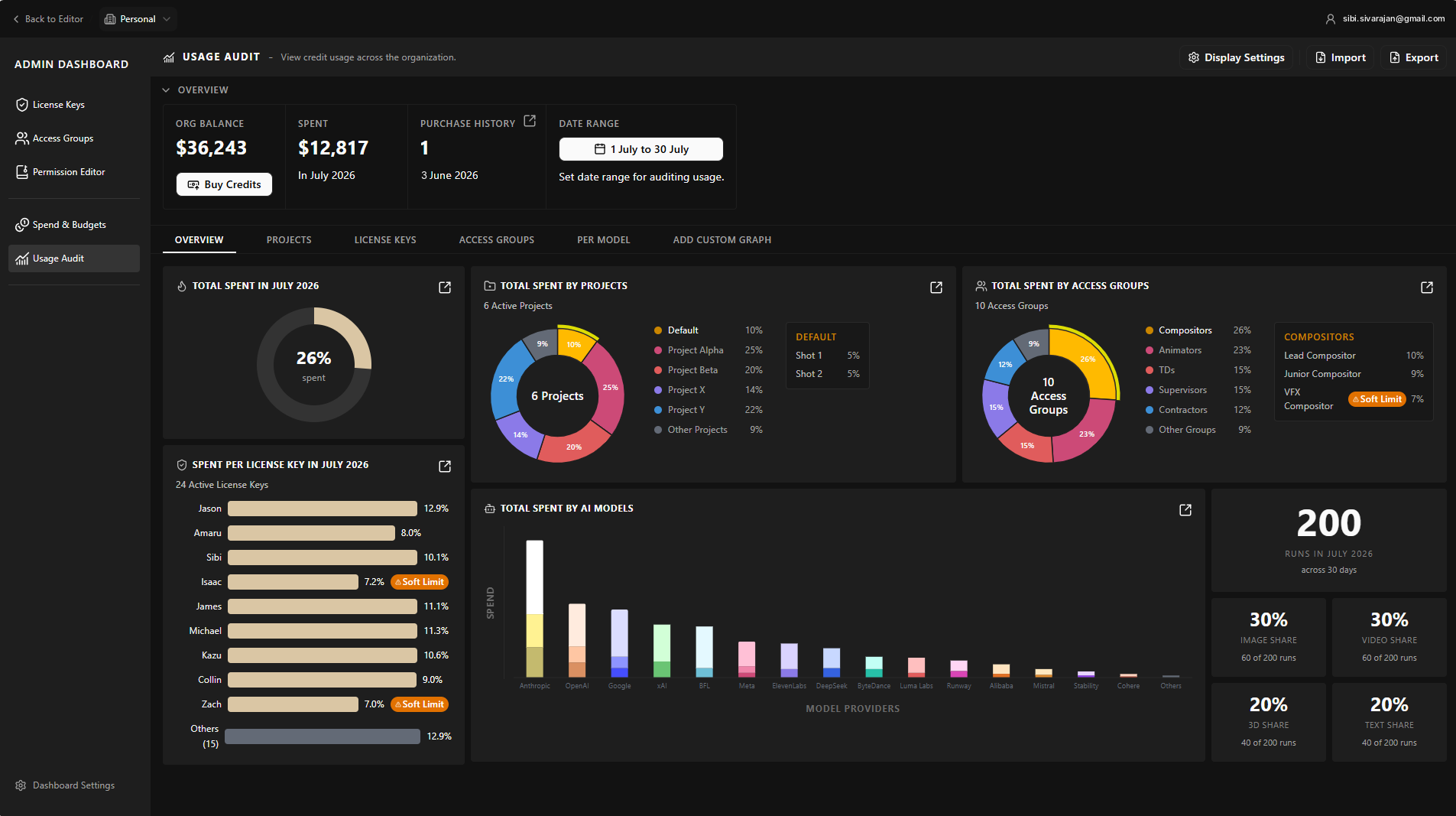
It lands in the same table as everything else
A key tag on the row (shown as CC), so an admin can filter to it when they want it separated
No export, no upload, nothing to go stale
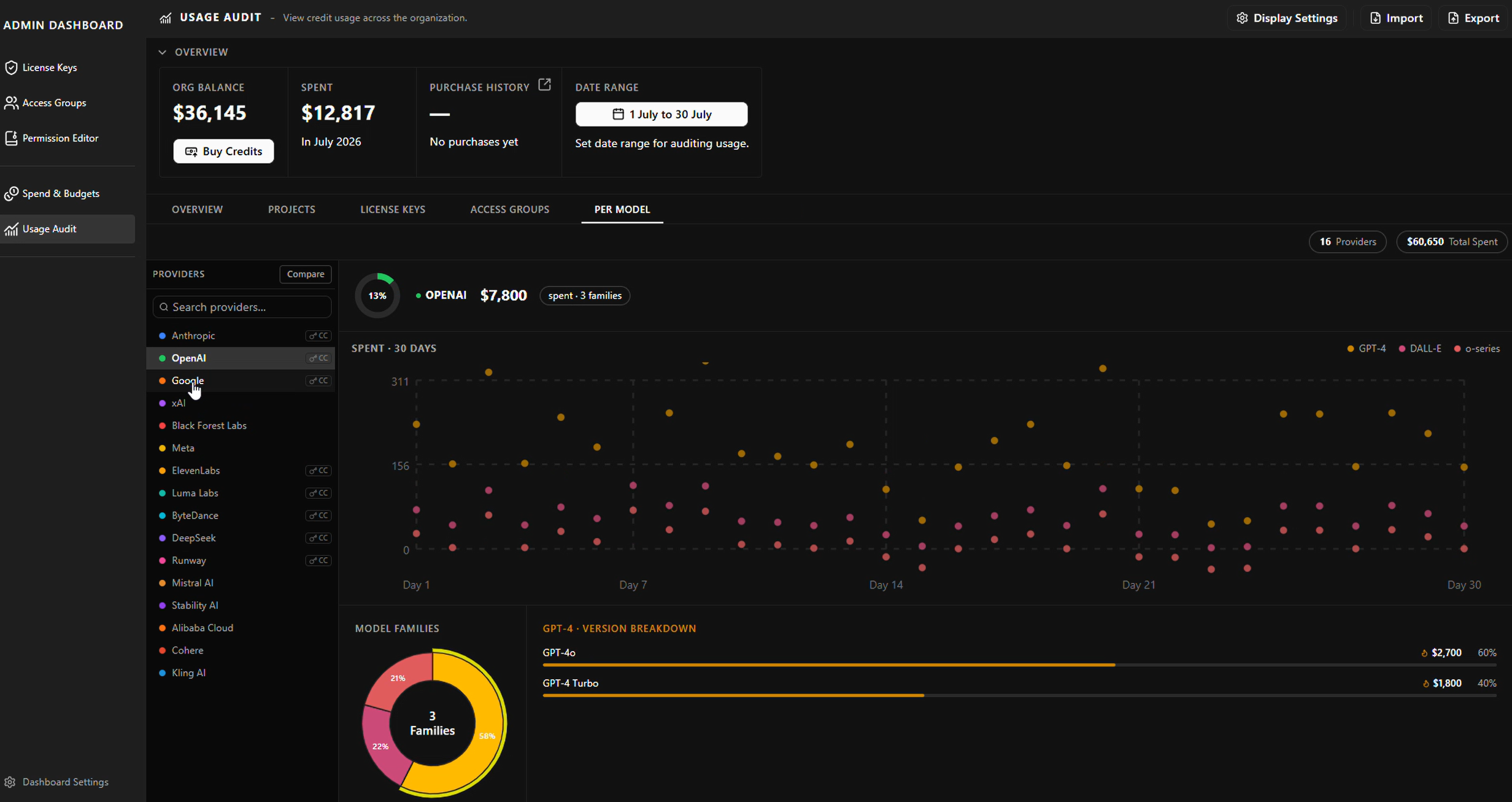
Usage Audit: Griptape and own-key providers in one list. Providers on the studio's own key carry the key and CC tag.
What it cost
A tag and a filter instead of a section of its own. An admin looking specifically for their own-key spend has one more click than a dedicated page would have given them.
In return, every number in the dashboard arrives the same way, and none of it depends on anyone remembering to upload anything.
Delegated admin: the same editor, one more scope
One of the three questions I took to SIGGRAPH was whether one administrator per studio was enough. It was not. A studio that depends on one person for every licence and every permission change has a bottleneck and a single point of failure, and security leads said so without being asked twice.
The obvious build is a separate roles system for the dashboard itself. I reused the permission editor instead.
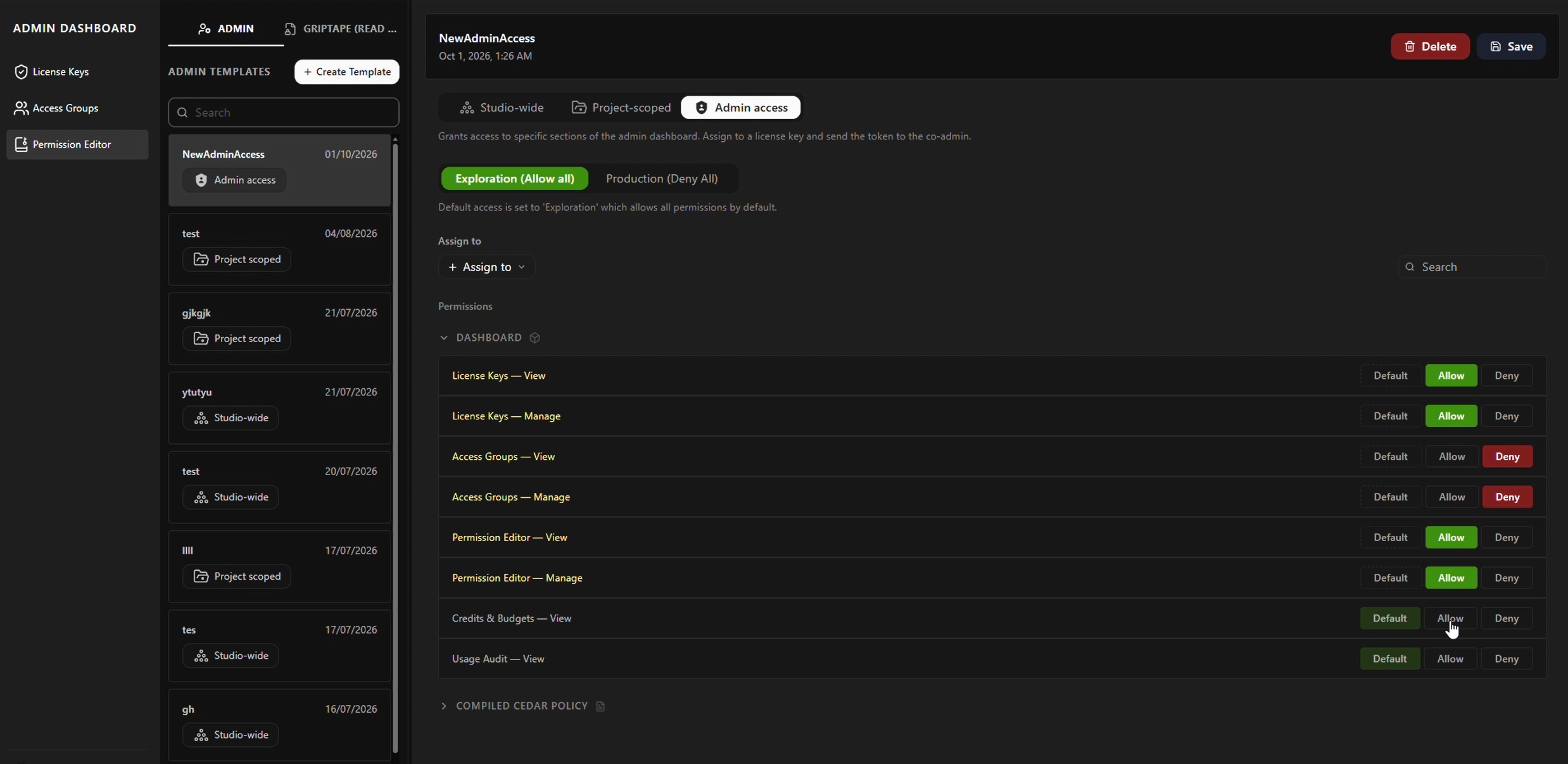
Admin access became a third scope alongside Studio-wide and Project-scoped. Same editor, same posture, same three states. An admin template is just a template whose capabilities happen to be parts of the dashboard rather than models and libraries.
What changed was the capability list. Instead of libraries and models, the rows are the dashboard’s own sections, split into view and manage:
Dashboard section
View
Manage
Licence keys
✓
✓
Access groups
✓
✓
Permission editor
✓
✓
Credits and budgets
✓
Usage audit
✓
So a studio hands someone exactly the part of the job they do. A coordinator who assigns licences gets licence keys to manage and the rest on view. Nobody gets the permission editor because they needed to add a seat.
The Admin access tab in the permission editor, with the dashboard capabilities as rows.
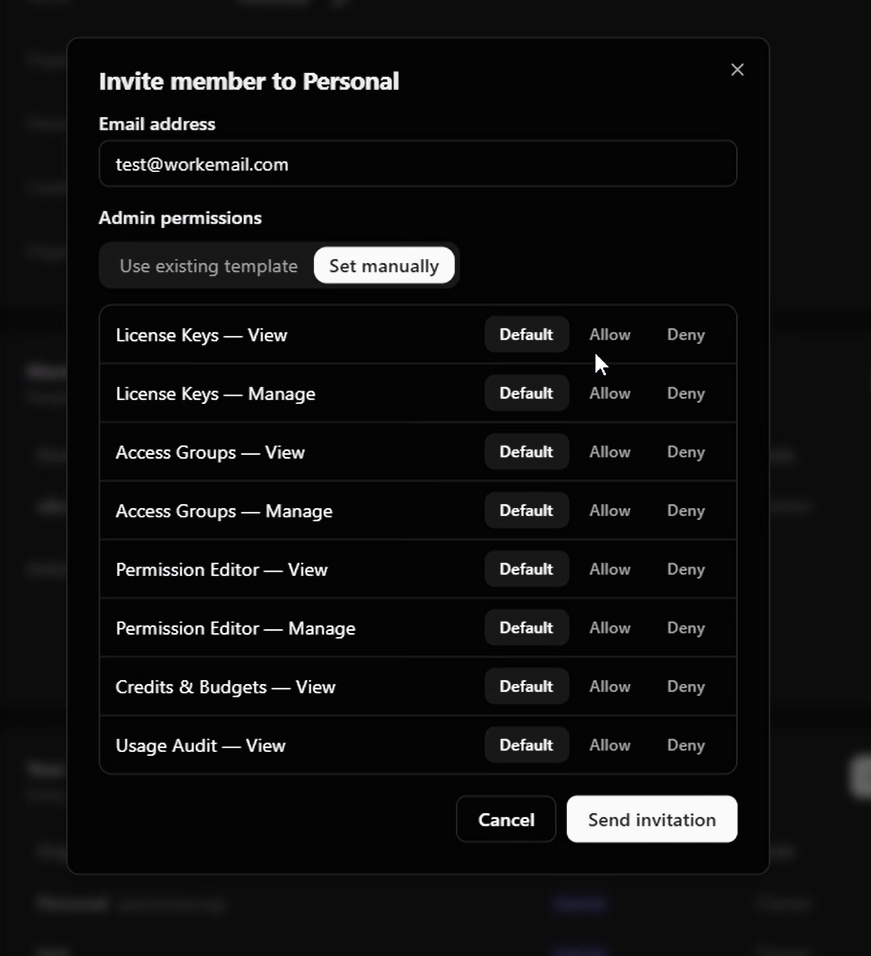
Co-admins are internal staff, so the invitation can go out by email. At that point you either pick an existing admin template or set the permissions by hand in the same dialog.
The invite dialog: use an existing template, or set manually.
It shipped in beta, in front of customers.
How it got built, and what happened
Three documents before any code, then built in the dev environment rather than next to it.
01 · Write it down
A PRD, a UX flow document and a design document
What to build and, just as usefully, what not to; the agreed flows; and behaviour, edge cases and which design system components to use. Claude Code works from them. Given a vague instruction a model produces a plausible mess, so the quality of the documents sets the quality of the build.
02 · Build
The frontend on my own branch, with Claude Code
In the product codebase, published to the dev environment so the PM and the engineers could open it and click it.
03 · Wire
Live API where it existed, mock data elsewhere
Balance and spend on the live API. The rest on mock data in the shapes the API had already agreed to return.
04 · Check
AI walked the flows before stakeholders did
Edge cases, missing states and dead ends, fixed first. Stakeholders got something they could click and try to break, rather than something I had to talk them through.
05 · Hand off
The branch was the handoff
The backend engineers picked it up and connected it. It came in ahead of the date, which mattered because it had to be ready for SIGGRAPH, and from there it shipped to customers.
How it got built.
The admin dashboard running in the dev environment.
What I proposed that didn't ship
Three things I designed that are not in the product. Worth saying, because the reason is different every time and only one of them was a bad idea.
Wrong
Per-run cost
Every run shows what it cost the moment it happened, so an artist sees the price instead of a producer finding out at the end of the month.
A busy show generates runs constantly, and a figure on every one turns the dashboard into noise. I argued myself out of this one, which is the cheapest kind of mistake to make.
Right, at the wrong time
A custom view tab
Instead of one date range, admins build the view: set the range, mix per project, per run and per model, and keep the combination.
Studios do not all ask the same question of their spend. It did not make the cut within the tight schedule, which is a scheduling answer rather than a design one.
Needs a security answer
An agent for the dashboard
An admin describes what they want to see or change in a sentence, and the dashboard assembles it across permissions, cost and usage.
It stopped on security, and I think that was right: a system whose job is deciding what is allowed should not get a second, less auditable way in. It is parked, and it is the one I would pick up first.
The custom view tab, with Add Graph to build a view and Ask AI to describe one.
Outcome
Studios had been hesitating. Governance was the objection that kept ending the sales conversation, and after the permission layer shipped those conversations went further. Studios began testing Griptape inside their own facilities, and the company landed its first enterprise customer, who went on to use the permission system and the usage auditing.
That is the company's account, not a number I measured; what I can say is that the objection that had been ending the conversation stopped doing so.